 Firefox
 1 / 3
1 / 3Loading font…
About Gord Qucik Font
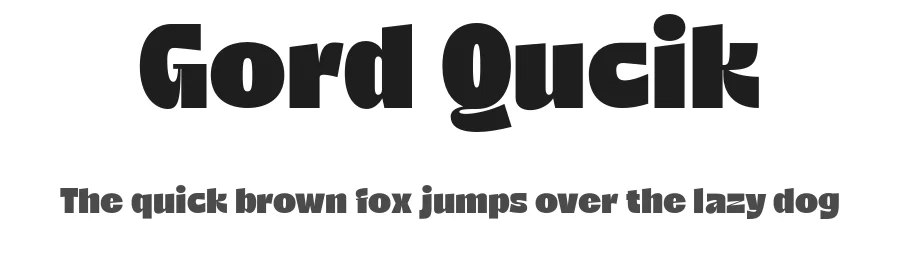
Bold headlines demand a typeface with genuine presence. Gord Qucik, designed by Sigit Dwipa Raharjo for Nirmana Visual, steps into that demanding role with multilingual capability that extends across 285+ Latin-based languages. This breadth of language support sets it apart from many display fonts, making it immediately practical for projects that cross regional and linguistic boundaries. Global campaigns and regional work alike benefit from having this kind of coverage baked into a single typeface, which simplifies your production workflow across different markets.
The real and lasting power of a display typeface shows up across different scales and contexts. Consider using it for international poster campaigns where one font needs to work across multiple territories, or magazine publication mastheads that demand visual hierarchy and stopping power. Podcast artwork headers, event promotional graphics, and product packaging that needs to announce itself from the shelf all benefit from a display face engineered to perform at size. With the Regular weight keeping everything grounded and readable even when scaled dramatically up, you maintain the visual weight headline work demands without compromise.
This suits brands and projects requiring strong multilingual display headlines. Free demo here for personal use, full commercial version on Creative Fabrica.
Style & Use Cases
- Overall Style
- Heavy, Eye-catching, Bold, Display
- Use Case
- Headlines, Logos
- Ideal For
- posters, branding, and social media graphics
- Pairs With
- a readable sans or serif for body
Gord Qucik Specifications
| Font Family | Gord Qucik Black |
| Style | Regular |
| Full Name | Gord Qucik Black |
| Version | 1.000 |
| Weight | 900 (Black) |
| Glyph Count | 327 glyphs |
| PostScript Name | GordQucik-Black |
| Designer | Sigit Dwipa Raharjo |
| Format | OTF (CFF) |
| File Size | 32.3 KB |
Languages Supported
Gord Qucik supports 285 languages.
How to Install Gord Qucik Font
Step-by-step instructions for every platform
- 1Download the Gord Qucik font file (.ttf or .otf).
- 2Locate the downloaded file in your Downloads folder.
- 3Right-click the font file.
- 4Select "Install" to install for the current user, or "Install for all users" to make it available system-wide.
- 5Gord Qucik is now available in Word, Photoshop, Illustrator, and all other apps.
More by Sigit Dwipa Raharjo
View all →


Browse fonts by theme
Curated collections →Saw a font in a picture? Identify any font from an image with our free Font Finder.
More Display Fonts
Browse all →







What pairs well with Gord Qucik Font?
Gord Qucik Font is a display font that shines as a display or heading face. Pair it with a clean sans-serif or serif font for body text — the contrast creates a clear hierarchy while the two styles stay balanced and easy to read.




Gord Qucik Font
Reviewed by the FontBoxDL team · Updated August 2026