 Firefox
 1 / 5
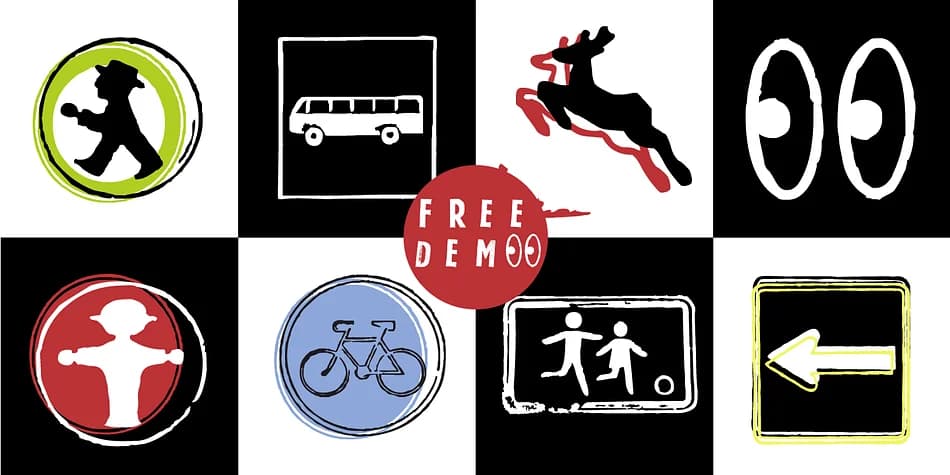
1 / 5About GDR Traffic Symbols Font
Rough, utilitarian edges give these symbols a distinctly vintage traffic signage character, yet they read as thoroughly contemporary and surprisingly relevant. GDR Traffic Symbols, designed by Manuel Viergutz for Typo Graphic Design in 2021, blends past and present into one cohesive dingbat collection built for designers who value personality over generic defaults. With 306 glyphs including arrows, icons, emojis, geometric shapes, and decorative marks, this font goes far beyond a standard symbol set.
Hidden decorative ligatures add playful personality to your designs: type #LOVE to get a heart, or #SMILE for a smiling face. Five stylistic alternates give you precise control over the look and feel to suit different moods and creative projects. This versatility makes it ideal for wine label designs with retro branding, concert and event posters, vintage vinyl artwork, and custom wayfinding graphics. The font shines brightest at large display sizes, where its rough letterforms and detailed marks truly become focal points rather than mere background elements.
Designers blending nostalgia with modern sensibility will find this font truly indispensable. Available on Creative Fabrica, it includes both the full typeface and a free demo version so you can explore and test the complete glyph set before committing to download.
Style & Use Cases
- Overall Style
- Iconographic
- Use Case
- Icons, Accents
- Ideal For
- ornaments, bullets, and decorative flourishes
- Pairs With
- any text font
How to Install GDR Traffic Symbols Font
Step-by-step instructions for every platform
- 1Download the GDR Traffic Symbols font file (.ttf or .otf).
- 2Locate the downloaded file in your Downloads folder.
- 3Right-click the font file.
- 4Select "Install" to install for the current user, or "Install for all users" to make it available system-wide.
- 5GDR Traffic Symbols is now available in Word, Photoshop, Illustrator, and all other apps.
More by Typo Graphic Design
View all →
Browse fonts by theme
Curated collections →Saw a font in a picture? Identify any font from an image with our free Font Finder.
More Dingbats Fonts
Browse all →







What pairs well with GDR Traffic Symbols Font?
GDR Traffic Symbols Font is a versatile dingbats font that works for both headings and body text. Pair it with a contrasting sans-serif or serif font to add visual interest and a clear distinction between titles and body copy.



GDR Traffic Symbols Font
Reviewed by the FontBoxDL team · Updated August 2026