 Firefox
 1 / 3
1 / 3Loading font…
About Gap Sans Font
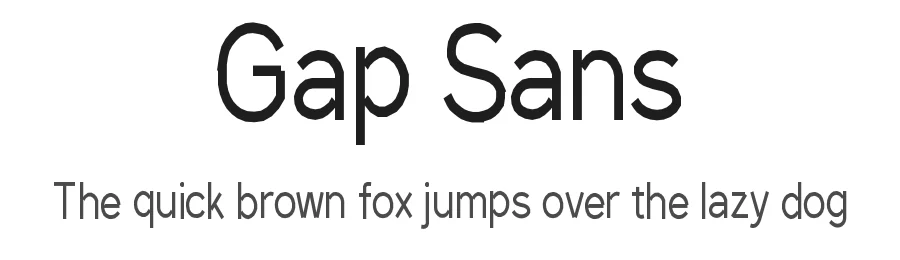
The call for entries poster is due tomorrow, the title has to fill half the sheet, and nothing in your library carries enough personality to hold it. Gap Sans, drawn by Alexandre Liziard and Étienne Ozeray and released through Interstices.io, was made for that moment. It sits in the display category, so it expects to be set large and given room.
The family ships as six files covering multiple weights and styles, which is unusual range for a display face. That matters when one project needs a heavy line for the headline and something lighter for the standfirst under it. Regular is the main file and the sensible starting point. Coverage runs past 230 Latin based languages, so a French subtitle or a Polish credit line will not send you hunting for a fallback.
Places it earns its keep: art school exhibition posters, independent magazine cover lines, music festival lineup boards, and packaging labels for small batch goods. Set it large, roughly 48pt and up, where a display face does its work, and hand body copy to a text family instead. If you do need Gap Sans at smaller sizes for a caption or a menu item, add a touch of letterspacing and proof it on paper before you sign off. Released under the Open Font License, it is free for personal and commercial use, and the files are hosted here for direct download.
Style & Use Cases
- Overall Style
- Eye-catching, Bold, display
- Use Case
- Headlines, Logos
- Ideal For
- posters, branding, and social media graphics
- Pairs With
- a readable sans or serif for body
Gap Sans Specifications
| Font Family | Gap Sans |
| Style | Regular |
| Full Name | Gap Sans Regular |
| Version | 1.6.1 - December 3. 2014 |
| Weight | 400 (Regular) |
| Glyph Count | 335 glyphs |
| PostScript Name | GapSans |
| Designer | Alexandre Liziard and Étienne Ozeray |
| Format | TTF (TrueType) |
| File Size | 28.5 KB |
Languages Supported
Gap Sans supports 230 languages.
How to Install Gap Sans Font
Step-by-step instructions for every platform
- 1Download the Gap Sans font file (.ttf or .otf).
- 2Locate the downloaded file in your Downloads folder.
- 3Right-click the font file.
- 4Select "Install" to install for the current user, or "Install for all users" to make it available system-wide.
- 5Gap Sans is now available in Word, Photoshop, Illustrator, and all other apps.
Browse fonts by theme
Curated collections →Saw a font in a picture? Identify any font from an image with our free Font Finder.
More Display Fonts
Browse all →







What pairs well with Gap Sans Font?
Gap Sans Font is a display font that shines as a display or heading face. Pair it with a clean sans-serif or serif font for body text — the contrast creates a clear hierarchy while the two styles stay balanced and easy to read.




Premium Display Fonts
★ PremiumWant something with more weights, glyphs, and commercial polish? These premium display fonts are worth a look.
Gap Sans Font
by Alexandre Liziard, Étienne Ozeray
Reviewed by the FontBoxDL team · Updated September 2026