 Firefox
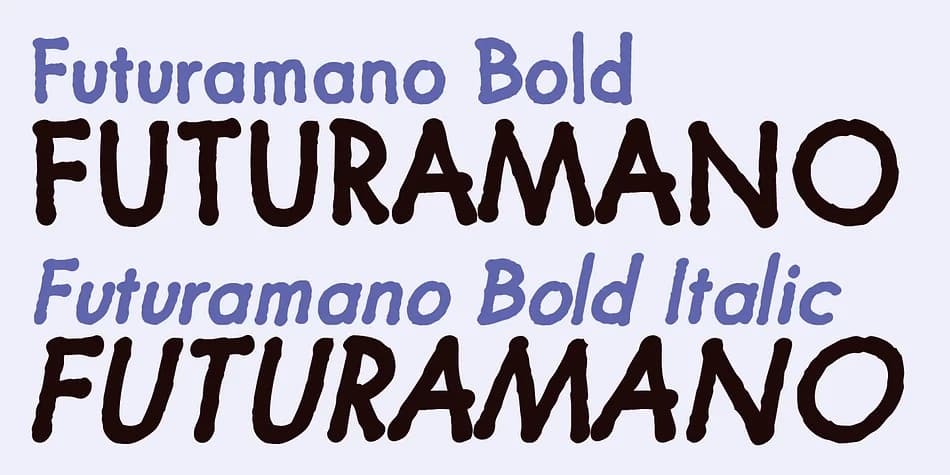 1 / 8
1 / 8About Futuramano Font
Picture a maker in her studio, packaging artisan goods for a small business. Futuramano, created by Wiescher-Design, is the handwritten font she reaches for when she needs lettering that feels genuinely hand-sketched rather than machine-perfect. This font borrows the geometric backbone from the classic Futura typeface but strips away all the formality, replacing it with loose, sketchy letterforms that genuinely feel handcrafted rather than computer-generated.
You'll find it shines across several specific applications where authenticity truly matters. Small-batch product labels gain immediate credibility from its casual touch, while custom gift tags and DIY event stationery benefit from the warmth it brings to any design. Scrapbookers and journaling enthusiasts frequently pair it with hand-drawn elements on mixed-media pages that demand character and personal energy. Rustic café menus, product packaging headlines, and handmade signage also showcase its particular strengths. Legibility remains solid even at larger display sizes, making it equally viable for headlines and body text applications.
The single-weight offering keeps everything straightforward and unfussy, staying completely true to its hand-drawn aesthetic roots. There's no unnecessary complexity here, just honest letterforms that read as authentically made by human hands rather than algorithms. Grab Futuramano on Creative Fabrica whenever you need that real sketched quality to anchor your design work.
Style & Use Cases
- Overall Style
- Bold, Distinctive
- Use Case
- Headlines, Posters
- Ideal For
- logos, packaging, and standout titles
- Pairs With
- a neutral sans-serif
How to Install Futuramano Font
Step-by-step instructions for every platform
- 1Download the Futuramano font file (.ttf or .otf).
- 2Locate the downloaded file in your Downloads folder.
- 3Right-click the font file.
- 4Select "Install" to install for the current user, or "Install for all users" to make it available system-wide.
- 5Futuramano is now available in Word, Photoshop, Illustrator, and all other apps.
More by Wiescher-Design
View all →
Browse fonts by theme
Curated collections →Saw a font in a picture? Identify any font from an image with our free Font Finder.
More Decorative Fonts
Browse all →







What pairs well with Futuramano Font?
Futuramano Font is a decorative font that shines as a display or heading face. Pair it with a clean sans-serif or serif font for body text — the contrast creates a clear hierarchy while the two styles stay balanced and easy to read.



Futuramano Font
Reviewed by the FontBoxDL team · Updated July 2026