 Firefox
 1 / 5
1 / 5About Fruites Doodle Font
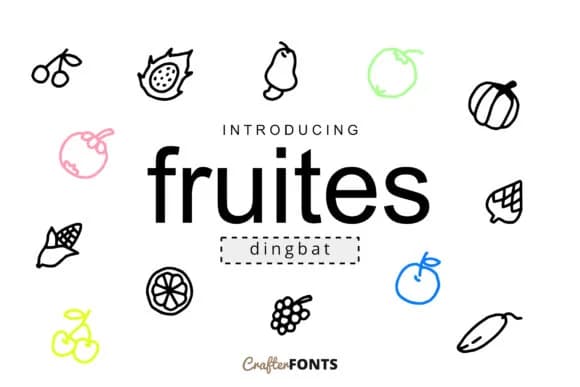
Fruites Doodle by CrafterFonts is a playful dingbat font built from hand-drawn fruit illustrations. Each character offers detailed, cheerful artwork that brings life to food-related design work. The collection shines on farmers market labels, cafe menu boards, recipe cards, and juice bar signage where that handmade polish really matters.
Social media graphics, Etsy shop branding, and children's book illustrations benefit equally from these doodles, which bring an organic, hand-sketched quality that customers notice. For boutique bakery packaging or small batch food labels, this collection delivers the right tone without feeling generic or overwrought.
Food designers and illustrators reach for dingbat fonts like this when they need flexible character options for composing original custom graphics without starting from scratch. Kitchen wall art, summer camp signage, DIY craft projects, and product packaging for emerging food brands all benefit tremendously from having extensive character sets that feel intentional rather than generic. The vector-based design ensures the doodles scale cleanly from tiny label sizes all the way through large format print applications. Fruites Doodle strikes that rare balance between playfulness and genuine usability that many dingbat fonts simply miss. Pick it up on Creative Fabrica and start building fruit-forward visuals for your next project.
Style & Use Cases
- Overall Style
- Iconographic, Doodle
- Use Case
- Icons, Accents
- Ideal For
- ornaments, bullets, and decorative flourishes
- Pairs With
- any text font
How to Install Fruites Doodle Font
Step-by-step instructions for every platform
- 1Download the Fruites Doodle font file (.ttf or .otf).
- 2Locate the downloaded file in your Downloads folder.
- 3Right-click the font file.
- 4Select "Install" to install for the current user, or "Install for all users" to make it available system-wide.
- 5Fruites Doodle is now available in Word, Photoshop, Illustrator, and all other apps.
More by CrafterFonts
View all →
Browse fonts by theme
Curated collections →Saw a font in a picture? Identify any font from an image with our free Font Finder.
More Dingbats Fonts
Browse all →







What pairs well with Fruites Doodle Font?
Fruites Doodle Font is a versatile dingbats font that works for both headings and body text. Pair it with a contrasting sans-serif or serif font to add visual interest and a clear distinction between titles and body copy.



Fruites Doodle Font
by CrafterFonts
Reviewed by the FontBoxDL team · Updated July 2026