 Firefox
 1 / 8
1 / 8Loading font…
About Frame Font
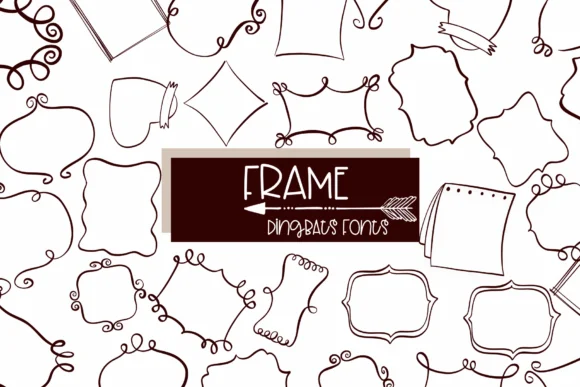
Imagine laying out an invitation suite for a backyard wedding. You're sketching frame borders in Illustrator when you realize Frame by Sirinart could do exactly what you need, faster and with more personality than a standard toolkit. This hand-drawn dingbat collection brings loose, scribbled line work to cards, certificates, and decorative layouts without feeling rigid or digital. The abstract style gives your projects that genuinely made-by-hand quality people actually respond to.
Frame's outline treatment works beautifully for vignetting and framing content around images and text. Use it for handmade gift tags, scrapbook page accents, or decorative borders on small-batch craft packaging and product labels for Etsy shops and maker markets. Designers also pull from it for hand-lettered sign graphics, wedding stationery systems, and DIY craft projects that need genuine character and warmth. The collection of decorative shapes gives you enough variety without overwhelming your layouts or slowing down your workflow when deadlines approach.
The font reads clearly at large sizes and holds its sketched charm even when scaled smaller for detailed work. Each frame shape feels organic rather than perfectly geometric, which is why the set works so well in mixed-media layouts and hand-assembled designs. It's waiting on Creative Fabrica whenever your next project needs that human-drawn edge.
Style & Use Cases
- Overall Style
- Iconographic, Design
- Use Case
- Icons, Accents
- Ideal For
- ornaments, bullets, and decorative flourishes
- Pairs With
- any text font
How to Install Frame Font
Step-by-step instructions for every platform
- 1Download the Frame font file (.ttf or .otf).
- 2Locate the downloaded file in your Downloads folder.
- 3Right-click the font file.
- 4Select "Install" to install for the current user, or "Install for all users" to make it available system-wide.
- 5Frame is now available in Word, Photoshop, Illustrator, and all other apps.
More by Sirinart
View all →

Browse fonts by theme
Curated collections →Saw a font in a picture? Identify any font from an image with our free Font Finder.
More Dingbats Fonts
Browse all →







What pairs well with Frame Font?
Frame Font is a versatile dingbats font that works for both headings and body text. Pair it with a contrasting sans-serif or serif font to add visual interest and a clear distinction between titles and body copy.




Frame Font
by Sirinart
Reviewed by the FontBoxDL team · Updated October 2026