
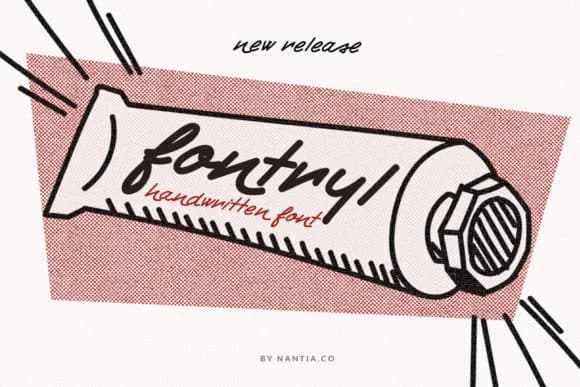
 1 / 9
1 / 9About Fontryl Font
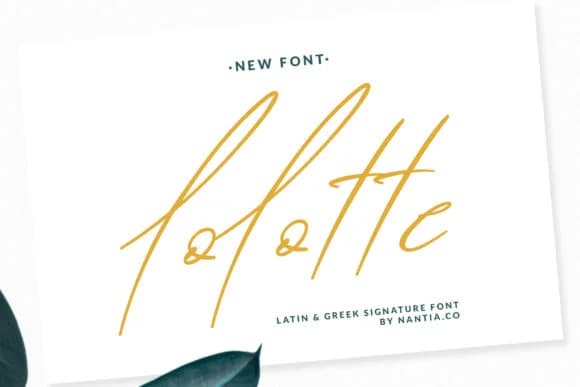
This font has that nostalgic, hand-drawn energy that stops you mid-scroll. Fontryl, designed by nantia, is a script-handwritten typeface built with real character and substantial visual weight that works beautifully across retro and vintage design spaces where personality truly matters.
It shines on vintage product labels where authenticity and charm matter deeply, speakeasy bar menus that demand personality and warmth, hand-lettered merchandise tags for independent retailers, and craft brewery branding that needs genuine human presence and voice. The multiple weights give you flexibility to push impact on headlines or dial back the intensity for secondary text and smaller applications. Each letterform carries intentionality and character through the strokes, which is essential when you're trying to evoke something handmade rather than digitally processed. The roughness and natural irregularity read as honest, not overdone or artificial.
Pair this with a clean, geometric sans-serif like Futura or Avenir to create visual contrast that lets the script truly breathe and stand out. The interplay between retro handwritten warmth and modern minimalism is where Fontryl finds real strength and purpose. You'll find it on Creative Fabrica, ready to add genuine human touch to your next creative project.
Style & Use Cases
- Overall Style
- Elegant, Flowing, Fontryl
- Use Case
- Invitations, Branding
- Ideal For
- wedding stationery, greeting cards, and signatures
- Pairs With
- a simple uppercase sans
How to Install Fontryl Font Font
Step-by-step instructions for every platform
- 1Download the Fontryl Font font file (.ttf or .otf).
- 2Locate the downloaded file in your Downloads folder.
- 3Right-click the font file.
- 4Select "Install" to install for the current user, or "Install for all users" to make it available system-wide.
- 5Fontryl Font is now available in Word, Photoshop, Illustrator, and all other apps.
More Script Handwritten Fonts
Browse all →







What pairs well with Fontryl Font?
Fontryl Font is a script font that shines as a display or heading face. Pair it with a clean sans-serif or serif font for body text — the contrast creates a clear hierarchy while the two styles stay balanced and easy to read.



Fontryl Font
by nantia
Reviewed by the FontBoxDL team · Updated August 2026