 Firefox
 1 / 8
1 / 8About Fluttering Wings Font
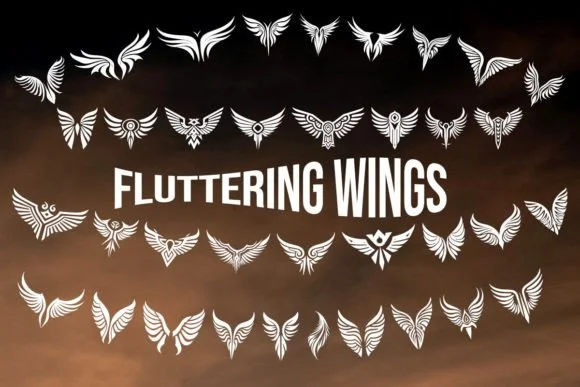
You're hand-lettering a wedding invitation suite when you realize you need ornamental touches that convey grace without being heavy-handed. Fluttering Wings, designed by MOMAT THIRTYONE, is built for exactly this work. This collection of 36 characters draws from the natural geometry of feathers and wings, offering understated elegance that lets your main design take the lead.
The set shines in greeting card borders, scrapbook embellishments, custom stationery suites, and DIY craft signage where a delicate accent carries real visual weight. Each symbol carries intricate feather-like patterns that remain legible as a page divider, a corner flourish, or standing alone as punctuation. The full collection includes multiple variations so you can swap characters for visual interest throughout a larger project, or layer them for textural depth.
What makes this collection practical is the thoughtful spacing and scale. The characters sit comfortably in your leading without disrupting the flow of your layouts. At larger sizes, the fine details in each wing pattern become visible without becoming fragile or difficult to reproduce. Grab Fluttering Wings on Creative Fabrica to add winged details to your next project.
Style & Use Cases
- Overall Style
- Iconographic, Dingbats Fonts
- Use Case
- Icons, Accents
- Ideal For
- ornaments, bullets, and decorative flourishes
- Pairs With
- any text font
How to Install Fluttering Wings Font
Step-by-step instructions for every platform
- 1Download the Fluttering Wings font file (.ttf or .otf).
- 2Locate the downloaded file in your Downloads folder.
- 3Right-click the font file.
- 4Select "Install" to install for the current user, or "Install for all users" to make it available system-wide.
- 5Fluttering Wings is now available in Word, Photoshop, Illustrator, and all other apps.
More by MOMAT THIRTYONE
View all →



Browse fonts by theme
Curated collections →Saw a font in a picture? Identify any font from an image with our free Font Finder.
More Dingbats Fonts
Browse all →







What pairs well with Fluttering Wings Font?
Fluttering Wings Font is a versatile dingbats font that works for both headings and body text. Pair it with a contrasting sans-serif or serif font to add visual interest and a clear distinction between titles and body copy.




Fluttering Wings Font
Reviewed by the FontBoxDL team · Updated June 2026