 Firefox
 1 / 4
1 / 4About Fluttering Feathers Font
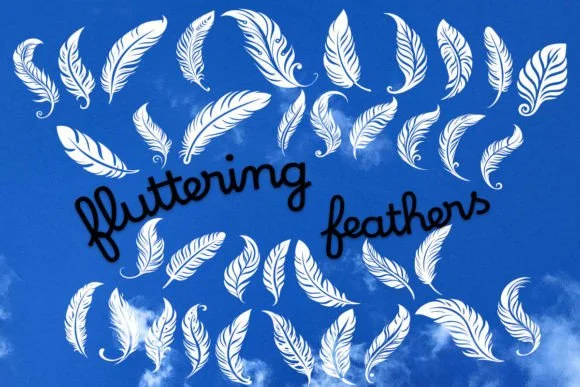
Fluttering Feathers by MOMAT THIRTYONE is a decorative dingbat collection that brings delicate, winged details to your lettering work. With 36 distinct butterfly and feather ornaments, this font set transforms ordinary type into something layered and organic. The characters feel hand-drawn without losing crispness, making them work equally well at headline sizes or as subtle accent elements woven throughout a layout.
The real power emerges when you layer these shapes into your designs. Wedding invitation suites benefit enormously from decorative flourishes that feel sophisticated rather than heavy-handed, and Fluttering Feathers hits that balance precisely. Scrapbooking layouts come alive with the variety here, letting you build custom borders and frame pages with natural, flowing ornaments that tie pages together. DIY craft labels gain immediate personality and warmth, perfect for homemade jams, candles, or specialty products you're selling on small-batch platforms. Personalized journal covers, greeting cards, and even nature-themed branding elements all become distinctly memorable when you introduce these winged motifs as decorative anchors.
Pairing these dingbats with serif or sans-serif bases amplifies their visual impact, or use them solo as elegant punctuation throughout your layouts. Grab this collection from Creative Fabrica and watch how these ornaments transform your designs.
Style & Use Cases
- Overall Style
- Iconographic, Dingbats Fonts
- Use Case
- Icons, Accents
- Ideal For
- ornaments, bullets, and decorative flourishes
- Pairs With
- any text font
How to Install Fluttering Feathers Font
Step-by-step instructions for every platform
- 1Download the Fluttering Feathers font file (.ttf or .otf).
- 2Locate the downloaded file in your Downloads folder.
- 3Right-click the font file.
- 4Select "Install" to install for the current user, or "Install for all users" to make it available system-wide.
- 5Fluttering Feathers is now available in Word, Photoshop, Illustrator, and all other apps.
More by MOMAT THIRTYONE
View all →



Browse fonts by theme
Curated collections →Saw a font in a picture? Identify any font from an image with our free Font Finder.
More Dingbats Fonts
Browse all →







What pairs well with Fluttering Feathers Font?
Fluttering Feathers Font is a versatile dingbats font that works for both headings and body text. Pair it with a contrasting sans-serif or serif font to add visual interest and a clear distinction between titles and body copy.




Fluttering Feathers Font
Reviewed by the FontBoxDL team · Updated July 2026