 Firefox
 1 / 8
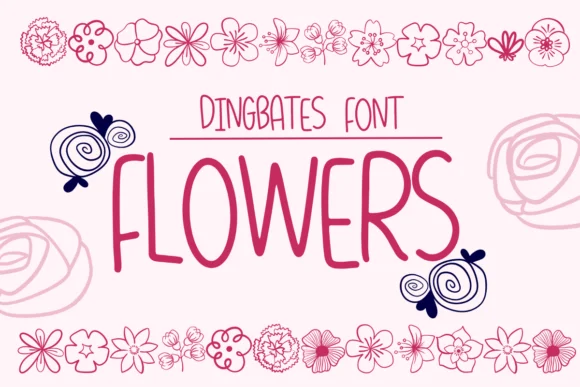
1 / 8About Flowers Font
This dingbat collection captures an organic, hand-sketched charm that reads warm and approachable. Flowers by Sirinart brings botanical motifs and sketch-style linework to projects needing authentic character without the slick finish of vector-built assets.
The hand-drawn quality shines across specific applications. Wedding invitation suites benefit from the delicate floral ornaments that add sophistication without looking templated. Herbalist and botanical product labels use these elements to reinforce natural, artisanal positioning on retail shelves. Seasonal greeting cards for spring or autumn occasions draw real character from the nature-forward aesthetic. Scrapbooking and mixed-media layouts work beautifully with the doodle aesthetic, letting you compose layered, intentional designs without decorative filler.
Each element holds visual weight because of how Sirinart rendered them with line variation and subtle imperfections that keep everything feeling human-made. That hand-drawn texture is what separates these dingbats from the sterile alternatives filling generic font libraries. When botanical elements need to feel genuine rather than digitally manufactured, this collection absolutely delivers. Pair it with a straightforward geometric sans-serif so each typeface plays its role without competing for attention. Creative Fabrica makes it easy to start building with Flowers whenever you're ready.
Style & Use Cases
- Overall Style
- Iconographic, Dingbats Fonts
- Use Case
- Icons, Accents
- Ideal For
- ornaments, bullets, and decorative flourishes
- Pairs With
- any text font
How to Install Flowers Font
Step-by-step instructions for every platform
- 1Download the Flowers font file (.ttf or .otf).
- 2Locate the downloaded file in your Downloads folder.
- 3Right-click the font file.
- 4Select "Install" to install for the current user, or "Install for all users" to make it available system-wide.
- 5Flowers is now available in Word, Photoshop, Illustrator, and all other apps.
More by Sirinart
View all →

Browse fonts by theme
Curated collections →Saw a font in a picture? Identify any font from an image with our free Font Finder.
More Dingbats Fonts
Browse all →







What pairs well with Flowers Font?
Flowers Font is a versatile dingbats font that works for both headings and body text. Pair it with a contrasting sans-serif or serif font to add visual interest and a clear distinction between titles and body copy.




Flowers Font
by Sirinart
Reviewed by the FontBoxDL team · Updated July 2026