 Firefox
 1 / 8
1 / 8About Floral Garden Font
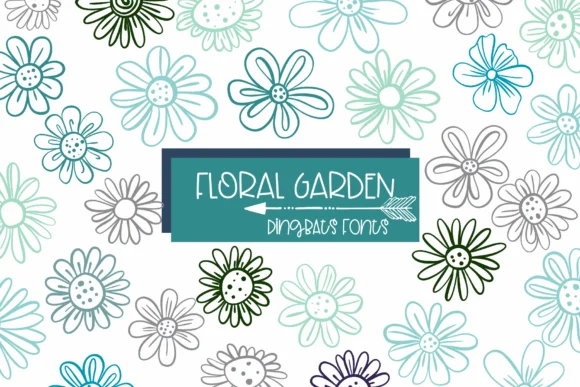
You're laying out a handmade wedding invitation suite, hunting for botanical elements that don't scream generic, and Floral Garden by Sirinart hits exactly that note. This dingbat font delivers hand-drawn flower illustrations as individual characters, each one carrying its own genuine personality. What sets it apart is the variety built into the entire character set: no two blooms feel identical, so your designs won't end up looking templated or like they came off an assembly line.
The font performs best in specific applications: DIY greeting card sets where that hand-drawn warmth really matters, scrapbooking layouts that need organic texture and life, Etsy product labels for botanical shops, and printed gift wrap designs. Because each flower is unique, you get visual interest even when repeating the same element throughout a layout. Both OTF and TTF formats are included, so you have options whether you're working in traditional design software or specialty craft programs.
Scale these florals up to make them focal points rather than accent details. That's where the nuance in each illustration becomes truly apparent. The hand-drawn quality stays consistent and engaging at any size, from large focal elements down to smaller supporting details. Find it on Creative Fabrica and start building designs with real character.
Style & Use Cases
- Overall Style
- Iconographic, Doodle
- Use Case
- Icons, Accents
- Ideal For
- ornaments, bullets, and decorative flourishes
- Pairs With
- any text font
How to Install Floral Garden Font
Step-by-step instructions for every platform
- 1Download the Floral Garden font file (.ttf or .otf).
- 2Locate the downloaded file in your Downloads folder.
- 3Right-click the font file.
- 4Select "Install" to install for the current user, or "Install for all users" to make it available system-wide.
- 5Floral Garden is now available in Word, Photoshop, Illustrator, and all other apps.
More by Sirinart
View all →

Browse fonts by theme
Curated collections →Saw a font in a picture? Identify any font from an image with our free Font Finder.
More Dingbats Fonts
Browse all →







What pairs well with Floral Garden Font?
Floral Garden Font is a versatile dingbats font that works for both headings and body text. Pair it with a contrasting sans-serif or serif font to add visual interest and a clear distinction between titles and body copy.




Floral Garden Font
by Sirinart
Reviewed by the FontBoxDL team · Updated June 2026