 Firefox
 1 / 4
1 / 4About Fire Flames Font
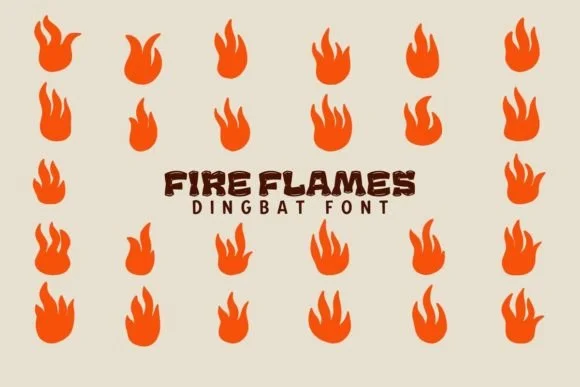
Picture designing holiday postcards or invitation suites that need ornamental flourishes, festive impact, and something unexpected: fire and flame motifs. Fire Flames by Eystore delivers that visual warmth without the clip-art awkwardness many decorative fonts carry. This dingbat collection gives you a carefully drawn library of fire symbols, heat shapes, and flame ornaments that integrate cleanly into layouts. Each symbol works standalone or layered in groups, offering flexibility without the visual confusion that plagues decorative fonts.
The real value shows up in specific applications. Christmas greeting card borders, custom gift tag designs, and bonfire party invitations all benefit from fire iconography that feels intentional. Craft makers integrate these symbols into wood-burned sign templates or holiday label designs. On Etsy product pages and artisan packaging, Fire Flames adds literal and conceptual warmth to candle labels, gift wrap, and tea packaging.
These are pure dingbats (shapes and ornaments, not letters), so you're not locked into text substitution. Layer them as decorative spacers, build patterns, or use them as accent elements. The symbols scale beautifully at large sizes, maintaining sharp detail in both print and digital work. Find Fire Flames on Creative Fabrica and put these symbols to work in your next project.
Style & Use Cases
- Overall Style
- Iconographic, Dingbat
- Use Case
- Icons, Accents
- Ideal For
- ornaments, bullets, and decorative flourishes
- Pairs With
- any text font
How to Install Fire Flames Font
Step-by-step instructions for every platform
- 1Download the Fire Flames font file (.ttf or .otf).
- 2Locate the downloaded file in your Downloads folder.
- 3Right-click the font file.
- 4Select "Install" to install for the current user, or "Install for all users" to make it available system-wide.
- 5Fire Flames is now available in Word, Photoshop, Illustrator, and all other apps.
More by Eystore
View all →
Browse fonts by theme
Curated collections →Saw a font in a picture? Identify any font from an image with our free Font Finder.
More Dingbats Fonts
Browse all →







What pairs well with Fire Flames Font?
Fire Flames Font is a versatile dingbats font that works for both headings and body text. Pair it with a contrasting sans-serif or serif font to add visual interest and a clear distinction between titles and body copy.




Fire Flames Font
by Eystore
Reviewed by the FontBoxDL team · Updated July 2026