 Firefox
 1 / 4
1 / 4About Feather Whisper Font
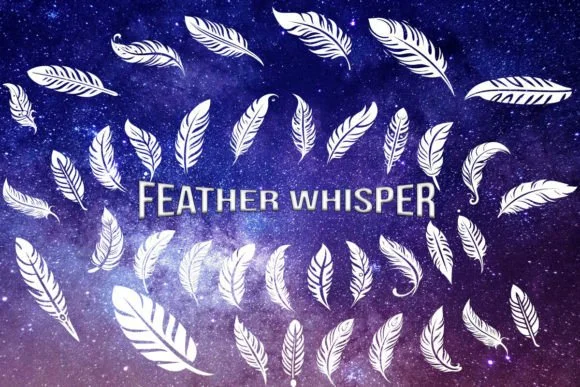
Feather Whisper is a dingbat font by MOMAT THIRTYONE, centered on decorative bird and feather motifs designed to add visual interest without overwhelming the page. The letterforms carry a distinctly organic quality, with each character suggesting a different feather shape or avian element. This restraint is the font's greatest strength, providing the flexibility needed for many projects without feeling heavy-handed or overly ornate.
You'll find practical applications across several design categories. Wedding invitation suites use these glyphs beautifully as borders or corner details. Boutique skincare packaging benefits from the nature-inspired feeling, as do Etsy product labels and DIY craft signs where hand-made sensibility is paramount. Event stationery, greeting cards, and small-run book projects all gain visual depth from these decorative elements. Since they're vector-based characters, scaling is reliable for large format prints, social media graphics, web designs, and other digital uses. The individual symbols function well both as subtle accents and as more prominent focal points, depending on your composition and layout needs.
This font suits designers building around natural, whimsical, or handcrafted brand identities. If you're working on product packaging, event collateral, or curated craft-focused designs, Feather Whisper fills the gap between too-plain and too-ornate. Find it on Creative Fabrica.
Style & Use Cases
- Overall Style
- Iconographic, Feather Dingbats Font
- Use Case
- Icons, Accents
- Ideal For
- ornaments, bullets, and decorative flourishes
- Pairs With
- any text font
How to Install Feather Whisper Font
Step-by-step instructions for every platform
- 1Download the Feather Whisper font file (.ttf or .otf).
- 2Locate the downloaded file in your Downloads folder.
- 3Right-click the font file.
- 4Select "Install" to install for the current user, or "Install for all users" to make it available system-wide.
- 5Feather Whisper is now available in Word, Photoshop, Illustrator, and all other apps.
More by MOMAT THIRTYONE
View all →



Browse fonts by theme
Curated collections →Saw a font in a picture? Identify any font from an image with our free Font Finder.
More Dingbats Fonts
Browse all →







What pairs well with Feather Whisper Font?
Feather Whisper Font is a versatile dingbats font that works for both headings and body text. Pair it with a contrasting sans-serif or serif font to add visual interest and a clear distinction between titles and body copy.




Feather Whisper Font
Reviewed by the FontBoxDL team · Updated July 2026