 Firefox
 1 / 5
1 / 5About Feather Badge Font
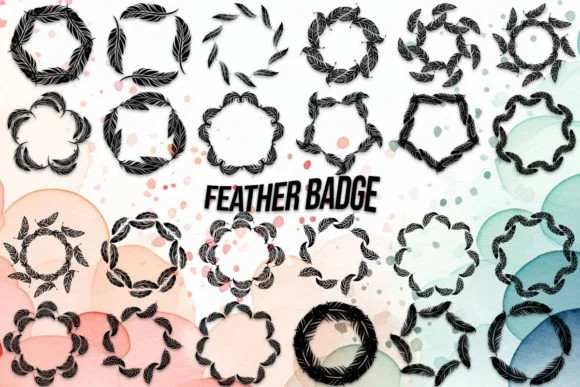
Picture yourself designing custom badges for a small jewelry brand, sketching out a logo that needs that perfect ornamental touch. Feather Badge, created by MOMAT THIRTYONE, delivers exactly that with a playful collection of feather-styled uppercase letters and numerals. Built as a dingbat font, it gives you A through Z plus 0-9, with each character rendered as a feathered form that works beautifully for emblematic applications.
This font suits wedding invitation suites with hand-drawn appeal, boutique cosmetics packaging and branding, DIY craft label designs, and anywhere you need a symbol that feels both artistic and refined. Small business owners often reach for it when creating custom badge sets, insignia work, and decorative elements that require real visual personality without sacrificing legibility or visual clarity. The letterforms work especially well as accent elements in larger compositions, bringing that feathered elegance to logos, labels, and custom typography pieces. Scale these characters up and the feather detail becomes a genuine design strength rather than visual clutter, making each character deliver its ornamental promise without overwhelming the overall layout.
Grab Feather Badge from Creative Fabrica and start using it for badges, logos, and any design where ornament needs to earn its place.
Style & Use Cases
- Overall Style
- Iconographic, Feather
- Use Case
- Icons, Accents
- Ideal For
- ornaments, bullets, and decorative flourishes
- Pairs With
- any text font
How to Install Feather Badge Font
Step-by-step instructions for every platform
- 1Download the Feather Badge font file (.ttf or .otf).
- 2Locate the downloaded file in your Downloads folder.
- 3Right-click the font file.
- 4Select "Install" to install for the current user, or "Install for all users" to make it available system-wide.
- 5Feather Badge is now available in Word, Photoshop, Illustrator, and all other apps.
More by MOMAT THIRTYONE
View all →



Browse fonts by theme
Curated collections →Saw a font in a picture? Identify any font from an image with our free Font Finder.
More Dingbats Fonts
Browse all →







What pairs well with Feather Badge Font?
Feather Badge Font is a versatile dingbats font that works for both headings and body text. Pair it with a contrasting sans-serif or serif font to add visual interest and a clear distinction between titles and body copy.




Feather Badge Font
Reviewed by the FontBoxDL team · Updated June 2026