 Firefox
 1 / 8
1 / 8About Falling Stars Font
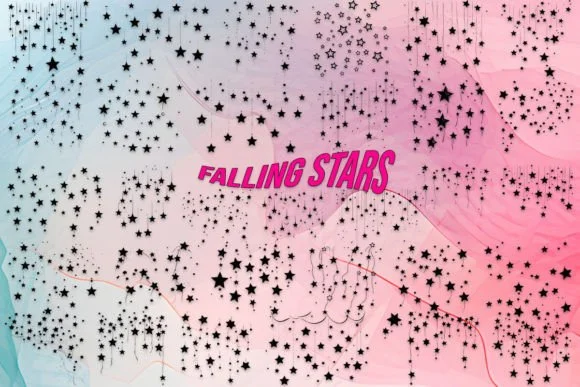
Falling Stars by MOMAT THIRTYONE swaps conventional letterforms for a constellation of star and celestial symbols. Rather than alphabet characters, this dingbat set uses each keystroke to place a different astronomical element, making it an intentional tool for layering visual effects instead of building readable text. The complete character set includes 26 uppercase shapes, 26 lowercase variants, and 10 numeric options, so you can build rich compositions through strategic repetition and stacking.
This font finds its strongest applications in projects that celebrate the night sky. Consider using it for constellation-themed greeting cards and event invitations that lean into astronomy, or layering it across DIY stargazing journals and constellation-mapping planners. Custom gift packaging for astronomy enthusiasts, educational materials about celestial navigation, and celestial-themed scrapbook layouts all benefit from having these recognizable symbols at hand. The shapes remain legible across different sizes and print contexts, which matters when you're relying on visual communication rather than text.
Designers building brands or materials around stargazing, planetarium education, or cosmic aesthetics will recognize the immediate utility here. This is less about replacing words and more about adding intentional, thematic visual texture to your compositions. Find Falling Stars on Creative Fabrica and start experimenting with how layered star patterns can enhance your next project.
Style & Use Cases
- Overall Style
- Iconographic, Celestial
- Use Case
- Icons, Accents
- Ideal For
- ornaments, bullets, and decorative flourishes
- Pairs With
- any text font
How to Install Falling Stars Font
Step-by-step instructions for every platform
- 1Download the Falling Stars font file (.ttf or .otf).
- 2Locate the downloaded file in your Downloads folder.
- 3Right-click the font file.
- 4Select "Install" to install for the current user, or "Install for all users" to make it available system-wide.
- 5Falling Stars is now available in Word, Photoshop, Illustrator, and all other apps.
More by MOMAT THIRTYONE
View all →



Browse fonts by theme
Curated collections →Saw a font in a picture? Identify any font from an image with our free Font Finder.
More Dingbats Fonts
Browse all →







What pairs well with Falling Stars Font?
Falling Stars Font is a versatile dingbats font that works for both headings and body text. Pair it with a contrasting sans-serif or serif font to add visual interest and a clear distinction between titles and body copy.




Falling Stars Font
Reviewed by the FontBoxDL team · Updated July 2026