 Firefox
 1 / 3
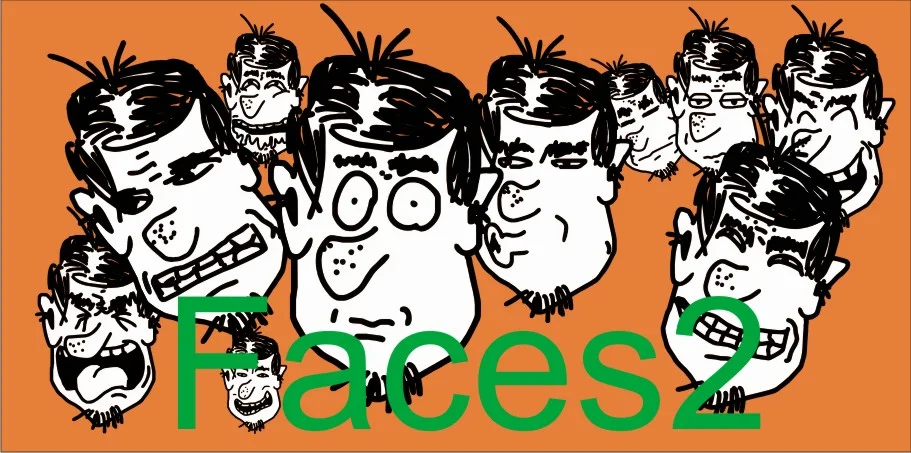
1 / 3About Faces Dingbat Set Font
Quirky charm floods any layout the moment you add these playful character faces. Faces Dingbat Set, designed by Gustavo Lucero, brings a comical energy that works beautifully across children's book spot illustrations, greeting card embellishments, DIY sticker sheet designs, and scrapbooking layouts. The set includes 26 distinct faces with a textured, hand-drawn quality that feels organic rather than sterile or mass-produced. Each character carries genuine personality, from cheerful grins to expressive quirks that invite interaction and storytelling.
These charming dingbats handle both whimsical and lighthearted projects with equal ease. The characters feel loose and approachable, yet each one is distinct enough that you won't feel limited by repetition across multiple pages or products. Use them for decorative accents, narrative flourishes, section dividers, or simple visual breaks that add character without overwhelming the composition. Their textured finish gives layouts a crafted, handmade quality that feels refreshing in a sea of smooth digital graphics.
Pair Faces Dingbat Set with a straightforward sans-serif for body copy or captions, letting the dingbats take the visual spotlight. This combination gives you room to play with personality while keeping the overall design grounded and readable. Grab it on Creative Fabrica and add this playful collection to your design library.
Style & Use Cases
- Overall Style
- Iconographic
- Use Case
- Icons, Accents
- Ideal For
- ornaments, bullets, and decorative flourishes
- Pairs With
- any text font
How to Install Faces Dingbat Set Font
Step-by-step instructions for every platform
- 1Download the Faces Dingbat Set font file (.ttf or .otf).
- 2Locate the downloaded file in your Downloads folder.
- 3Right-click the font file.
- 4Select "Install" to install for the current user, or "Install for all users" to make it available system-wide.
- 5Faces Dingbat Set is now available in Word, Photoshop, Illustrator, and all other apps.
More by Gustavo Lucero
View all →

Browse fonts by theme
Curated collections →Saw a font in a picture? Identify any font from an image with our free Font Finder.
More Dingbats Fonts
Browse all →







What pairs well with Faces Dingbat Set Font?
Faces Dingbat Set Font is a versatile dingbats font that works for both headings and body text. Pair it with a contrasting sans-serif or serif font to add visual interest and a clear distinction between titles and body copy.




Faces Dingbat Set Font
Reviewed by the FontBoxDL team · Updated July 2026