 Firefox
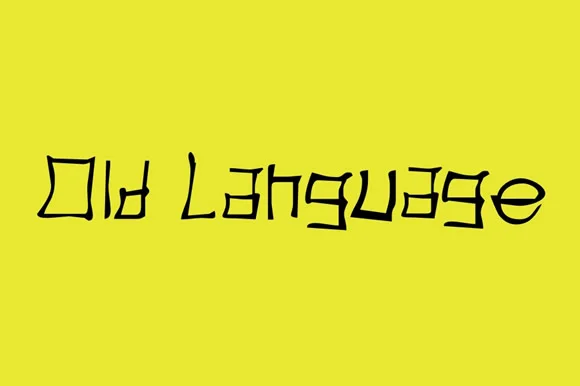
About Old Language Font
Old Language Font by Gustavo Lucero is a flowing script typeface that captures the elegance and refinement inherent in historical letterwork and traditional handwritten craftsmanship. Each character moves with organic rhythm and natural grace, drawing direct inspiration from centuries-old manuscript traditions and classical calligraphic artistry while maintaining full functionality for contemporary creative applications across both digital and print mediums.
This flowing script typeface proves especially valuable for creative projects demanding both historical authenticity and genuine personal warmth in their visual communication. Designers consistently choose it for wedding invitation suites that convey heirloom quality, vintage-inspired product labels destined for retail shelves, sophisticated book cover designs, curated greeting card collections, and formal certificate layouts where handcrafted letterforms substantially amplify perceived craftsmanship and value. The font's character-rich nature also delivers compelling results in logo design work where personality, warmth, and emotional connection prove essential, particularly within luxury, artisan, heritage brand, and boutique retail sectors seeking to differentiate through authentic aesthetics.
Beyond traditional print applications, the typeface translates effectively to social media graphics, email marketing headers, and website design where a handcrafted sensibility strengthens brand storytelling and audience engagement. Both DIY creators and professional designers find it indispensable for personal and commercial projects requiring authentic character and historical resonance. Access Old Language Font through Creative Fabrica to bring this script's historical elegance and refined personality to your next creative project.
Style & Use Cases
- Overall Style
- Elegant, Flowing, Old Language
- Use Case
- Invitations, Branding
- Ideal For
- wedding stationery, greeting cards, and signatures
- Pairs With
- a simple uppercase sans
How to Install Old Language Font Font
Step-by-step instructions for every platform
- 1Download the Old Language Font font file (.ttf or .otf).
- 2Locate the downloaded file in your Downloads folder.
- 3Right-click the font file.
- 4Select "Install" to install for the current user, or "Install for all users" to make it available system-wide.
- 5Old Language Font is now available in Word, Photoshop, Illustrator, and all other apps.
More by Gustavo Lucero
View all →
Browse fonts by theme
Curated collections →Saw a font in a picture? Identify any font from an image with our free Font Finder.
More Script Handwritten Fonts
Browse all →







What pairs well with Old Language Font?
Old Language Font is a script font that shines as a display or heading face. Pair it with a clean sans-serif or serif font for body text — the contrast creates a clear hierarchy while the two styles stay balanced and easy to read.




Old Language Font
Reviewed by the FontBoxDL team · Updated May 2026