 Firefox
 1 / 7
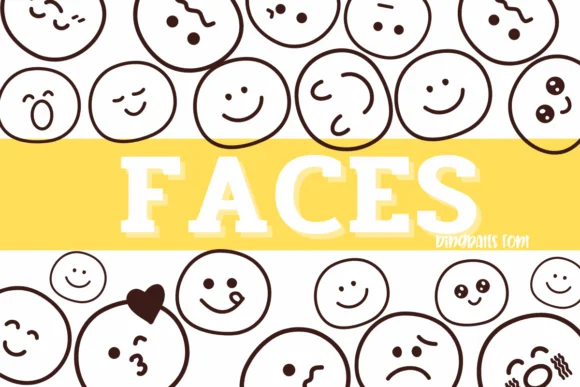
1 / 7About Faces Font
You're putting together a wedding invitation suite and looking for botanical elements that look hand-drawn, not mass-produced. Faces by Sirinart is your answer. This dingbat font combines sketch-style illustrations (leaves, flowers, herbs, grasses, stems) as individual characters you can colorize, scale, and arrange independently.
The practical advantage: total flexibility. Use the dingbats as decorative borders on invitation suites and thank-you cards, weave them through hand-lettered greeting cards to add visual interest, or build repeating botanical patterns for product labels and small-batch packaging. They work just as well scattered through scrapbooking layouts, cut and arranged for DIY craft signage, or placed in nature journal templates and botanical sketchbooks. Both OTF and TTF versions are included, along with separate outline and colored variants so you can pick between line work and solid fills.
Because each illustration is its own character, you control size and color independently, giving you options most fonts can't match. This is the real advantage for anyone building handmade-looking designs at scale. Grab Faces from Creative Fabrica and you'll have a complete set of botanical dingbats ready to use.
Style & Use Cases
- Overall Style
- Iconographic, Fonts
- Use Case
- Icons, Accents
- Ideal For
- ornaments, bullets, and decorative flourishes
- Pairs With
- any text font
How to Install Faces Font
Step-by-step instructions for every platform
- 1Download the Faces font file (.ttf or .otf).
- 2Locate the downloaded file in your Downloads folder.
- 3Right-click the font file.
- 4Select "Install" to install for the current user, or "Install for all users" to make it available system-wide.
- 5Faces is now available in Word, Photoshop, Illustrator, and all other apps.
More by Sirinart
View all →

Browse fonts by theme
Curated collections →Saw a font in a picture? Identify any font from an image with our free Font Finder.
More Dingbats Fonts
Browse all →






What pairs well with Faces Font?
Faces Font is a versatile dingbats font that works for both headings and body text. Pair it with a contrasting sans-serif or serif font to add visual interest and a clear distinction between titles and body copy.




Faces Font
by Sirinart
Reviewed by the FontBoxDL team · Updated July 2026