 Firefox
 1 / 6
1 / 6About Face Type Font
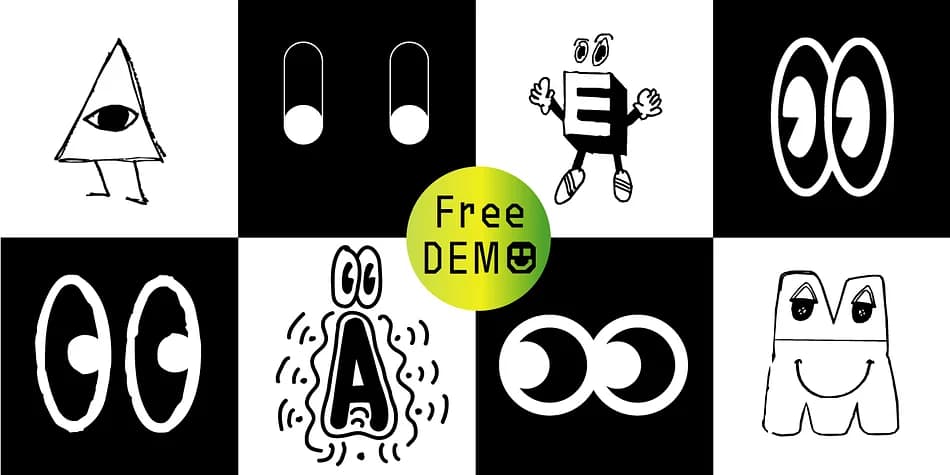
Face Type, created by Manuel Viergutz for Typo Graphic Design in 2021, trades traditional letterforms for a vibrant collection of icons and playful dingbats that bring personality to visual communication. With 357 glyphs, this set includes decorative symbols, emojis, and ornamental extras that work as standalone graphics or supporting elements, giving designers a shorthand library of visual forms. Four stylistic sets provide variation within the same weight, letting you swap between different moods and visual flavors without hunting for additional typefaces.
Where this really shines is in display contexts where you want something beyond standard typography. Reach for Face Type when building custom wedding invitation suites, designing social media highlight graphics, creating boutique brand icon systems, or adding visual flair to digital product graphics. Its playful character set works equally well as a secondary font in magazines and advertisements, breaking up text-heavy layouts with visual punctuation. Delivered in both .otf for print and .woff for web, Face Type scales beautifully at headline sizes.
This font belongs in the hands of designers building quirky brand identities, small business graphics, or anyone working on projects that could use a touch of visual wit. Grab it on Creative Fabrica and explore the free demo version first to see which stylistic set matches your vision.
Style & Use Cases
- Overall Style
- Iconographic
- Use Case
- Icons, Accents
- Ideal For
- ornaments, bullets, and decorative flourishes
- Pairs With
- any text font
How to Install Face Type Font
Step-by-step instructions for every platform
- 1Download the Face Type font file (.ttf or .otf).
- 2Locate the downloaded file in your Downloads folder.
- 3Right-click the font file.
- 4Select "Install" to install for the current user, or "Install for all users" to make it available system-wide.
- 5Face Type is now available in Word, Photoshop, Illustrator, and all other apps.
More by Typo Graphic Design
View all →

Browse fonts by theme
Curated collections →Saw a font in a picture? Identify any font from an image with our free Font Finder.
More Dingbats Fonts
Browse all →







What pairs well with Face Type Font?
Face Type Font is a versatile dingbats font that works for both headings and body text. Pair it with a contrasting sans-serif or serif font to add visual interest and a clear distinction between titles and body copy.



Face Type Font
Reviewed by the FontBoxDL team · Updated August 2026