 Firefox
 1 / 8
1 / 8Loading font…
About Evil Eye Font
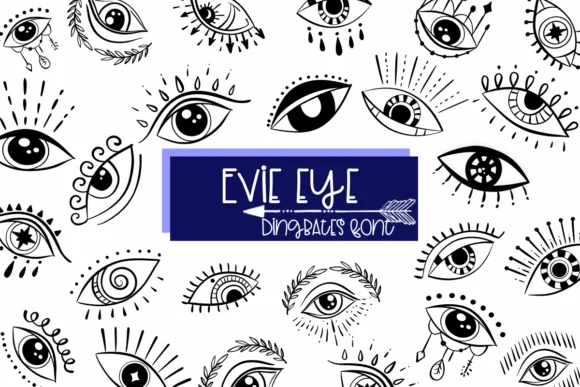
Evil Eye by Sirinart is a dingbat font that swaps every letter for the evil eye symbol, grounded in cultural traditions that view this amulet as a ward against negativity and harm. Rather than functioning as readable text, this symbol font works as a decorative and spiritual visual element, perfect for layering into designs or stamping across artwork that needs symbolic repetition and visual interest.
The symbol appears consistently across your keyboard, making it straightforward to create repeated patterns, talismans, or spiritually-themed compositions without hunting for individual assets. Each keystroke delivers the same eye symbol, so consistency isn't a concern whether you're building repeated motifs or filling negative space with a cohesive visual element. This approach works especially well for greeting card illustrations, journal and planner stickers, or decorative elements in both print and digital designs. Consider using it for tarot-themed packaging labels, amulet borders in boutique spiritual product packaging, ornamental frames for spell-work artwork, or social media graphics layered with text. The font comes in both OTF and TTF formats and integrates smoothly with Procreate, Affinity Designer, and Affinity Photo, giving you flexibility across design tools.
Get Evil Eye on Creative Fabrica to start creating with cultural awareness and intention.
Style & Use Cases
- Overall Style
- Iconographic, Fonts
- Use Case
- Icons, Accents
- Ideal For
- ornaments, bullets, and decorative flourishes
- Pairs With
- any text font
How to Install Evil Eye Font
Step-by-step instructions for every platform
- 1Download the Evil Eye font file (.ttf or .otf).
- 2Locate the downloaded file in your Downloads folder.
- 3Right-click the font file.
- 4Select "Install" to install for the current user, or "Install for all users" to make it available system-wide.
- 5Evil Eye is now available in Word, Photoshop, Illustrator, and all other apps.
More by Sirinart
View all →

Browse fonts by theme
Curated collections →Saw a font in a picture? Identify any font from an image with our free Font Finder.
More Dingbats Fonts
Browse all →







What pairs well with Evil Eye Font?
Evil Eye Font is a versatile dingbats font that works for both headings and body text. Pair it with a contrasting sans-serif or serif font to add visual interest and a clear distinction between titles and body copy.




Evil Eye Font
by Sirinart
Reviewed by the FontBoxDL team · Updated October 2026