 Firefox
 1 / 8
1 / 8About Elegant Butterfly Font
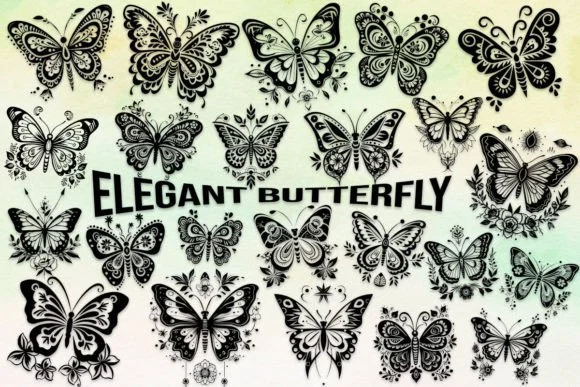
These delicate, fluttering symbols evoke the graceful movement of wings in sunlight. Elegant Butterfly, created by MOMAT THIRTYONE, is a dingbat typeface that transforms a simple keystroke into an ornamental element drawn from nature. The collection maps 62 unique butterfly variations across uppercase letters, lowercase letters, and the full suite of numerals 0-9, offering surprising flexibility when you're building layered or mixed-media designs.
Wedding invitation suites use these symbols to punctuate elegant copy without overwhelming minimalist layouts or formal typography. Boutique skincare and cosmetics brands scatter butterfly motifs across packaging to soften product labels while evoking natural ingredients and botanical themes. For Etsy sellers creating nature-themed stationery collections and seasonal greeting cards, the butterflies instantly add visual personality and distinction. DIY makers tackling craft signage for garden parties, botanical weddings, or children's room décor appreciate having an entire alphabet of butterfly variations without hunting through multiple clipart or icon sources for the right style.
Using decorative dingbats effectively means pairing them with a sturdy structural counterweight. A clean, readable sans-serif like Montserrat or Inter lets your body copy breathe while the butterflies handle the visual storytelling and decorative emphasis. It's available on Creative Fabrica whenever you need these ornaments.
Style & Use Cases
- Overall Style
- Iconographic, Butterfly Dingbats
- Use Case
- Icons, Accents
- Ideal For
- ornaments, bullets, and decorative flourishes
- Pairs With
- any text font
How to Install Elegant Butterfly Font
Step-by-step instructions for every platform
- 1Download the Elegant Butterfly font file (.ttf or .otf).
- 2Locate the downloaded file in your Downloads folder.
- 3Right-click the font file.
- 4Select "Install" to install for the current user, or "Install for all users" to make it available system-wide.
- 5Elegant Butterfly is now available in Word, Photoshop, Illustrator, and all other apps.
More by MOMAT THIRTYONE
View all →



Browse fonts by theme
Curated collections →Saw a font in a picture? Identify any font from an image with our free Font Finder.
More Dingbats Fonts
Browse all →







What pairs well with Elegant Butterfly Font?
Elegant Butterfly Font is a versatile dingbats font that works for both headings and body text. Pair it with a contrasting sans-serif or serif font to add visual interest and a clear distinction between titles and body copy.




Elegant Butterfly Font
Reviewed by the FontBoxDL team · Updated July 2026