 Firefox
About ELECTROSTATIC JNL Font
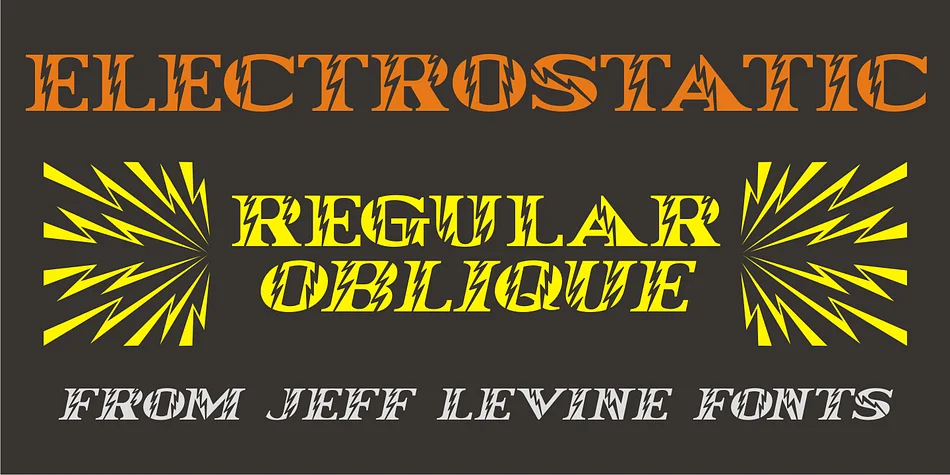
Electrostatic JNL trades in raw visual energy. Designer Jeff Levine drew from lettering used by New York's WMCA in the early broadcast era, capturing that period electronics aesthetic in a display font built for maximum visual impact. Jagged lightning bolts slice straight through the bold, oversize letterforms, creating a typeface that practically crackles with 1930s radio station charisma.
The typeface works best when you need bold motion and unmistakable retro flavor on the page. It's right at home on classic radio advertising campaigns, garage rock concert posters, energy drink bottle labels, and retro-futuristic product packaging designs. Comic book cover lettering, Halloween party invitation graphics, and podcast episode artwork all gain instant character from its jagged novelty style. Uncompromising and proud of its roots, this display face gives any design the essence of 1930s-to-1950s sensibility without ever veering into pastiche or kitsch.
This font includes both regular and oblique versions, giving designers compositional flexibility for different layout approaches. That broad toolkit suits anyone tackling retro branding projects, vintage-inspired band visual identities, speakeasy promotions, event graphics, or retro poster design. When you want period electricity without subtlety or apology, Electrostatic JNL delivers. Find it on Creative Fabrica and let this bold display typeface do what it does best.
Style & Use Cases
- Overall Style
- Eye-catching, Bold
- Use Case
- Headlines, Logos
- Ideal For
- posters, branding, and social media graphics
- Pairs With
- a readable sans or serif for body
How to Install ELECTROSTATIC JNL Font
Step-by-step instructions for every platform
- 1Download the ELECTROSTATIC JNL font file (.ttf or .otf).
- 2Locate the downloaded file in your Downloads folder.
- 3Right-click the font file.
- 4Select "Install" to install for the current user, or "Install for all users" to make it available system-wide.
- 5ELECTROSTATIC JNL is now available in Word, Photoshop, Illustrator, and all other apps.
More by Jeff Levine Fonts
View all →



Browse fonts by theme
Curated collections →Saw a font in a picture? Identify any font from an image with our free Font Finder.
More Display Fonts
Browse all →







What pairs well with ELECTROSTATIC JNL Font?
ELECTROSTATIC JNL Font is a display font that shines as a display or heading face. Pair it with a clean sans-serif or serif font for body text — the contrast creates a clear hierarchy while the two styles stay balanced and easy to read.




ELECTROSTATIC JNL Font
Reviewed by the FontBoxDL team · Updated September 2026