 Firefox
 1 / 10
About DeFonte Plus Font
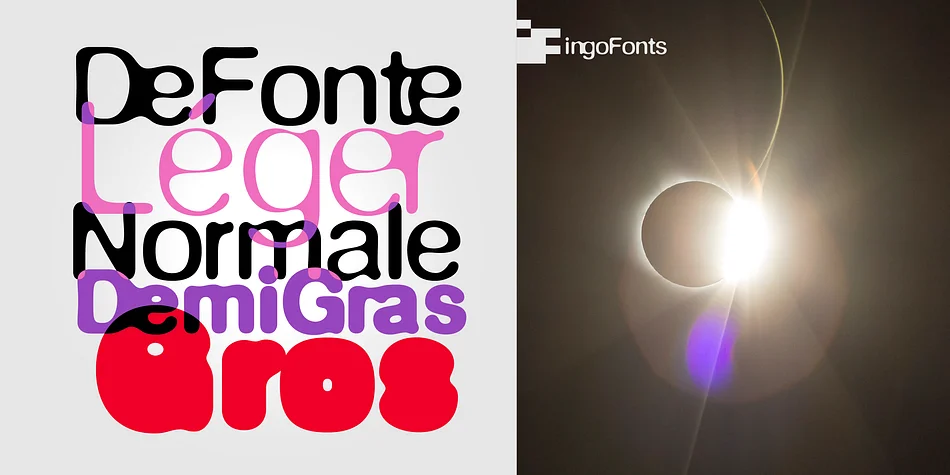
Variation of ”Helvetica“ according to the ”blur“ principle.
The underlying typeface is based on ”Helvetica“, the only true ”run-of-the-mill“ typeface of the twentieth century. The distorted principle used simulates the photographic effect of halation and/or overexposure.
The light typestyle, DeFonte Léger, nearly breaks on the thin points, whereas on those points where the lines meet or cross, dark spots remain. The characters are “nibbled at” from the inner and outer brightness.
On the normal and semibold typestyles, DeFonte Normale and DeFonte Demi Gras, the effect is limited almost exclusively to the end strokes and corners, which appears to be strongly rounded off. The bold version DeFonte Gros is especially attractive. As a result of ”overexposure“, counters (internal spaces) are closed in, while characters become blurred and turn into spots; new characteristic forms are created which are astoundingly legible.
Style & Use Cases
- Overall Style
- Eye-catching, Bold
- Use Case
- Headlines, Logos
- Ideal For
- posters, branding, and social media graphics
- Pairs With
- a readable sans or serif for body
How to Install DeFonte Plus Font
Step-by-step instructions for every platform
- 1Download the DeFonte Plus font file (.ttf or .otf).
- 2Locate the downloaded file in your Downloads folder.
- 3Right-click the font file.
- 4Select "Install" to install for the current user, or "Install for all users" to make it available system-wide.
- 5DeFonte Plus is now available in Word, Photoshop, Illustrator, and all other apps.
More by ingoFonts
View all →
Browse fonts by theme
Curated collections →Saw a font in a picture? Identify any font from an image with our free Font Finder.
More Display Fonts
Browse all →







What pairs well with DeFonte Plus Font?
DeFonte Plus Font is a display font that shines as a display or heading face. Pair it with a clean sans-serif or serif font for body text — the contrast creates a clear hierarchy while the two styles stay balanced and easy to read.




DeFonte Plus Font
by ingoFonts
Reviewed by the FontBoxDL team · Updated April 2026