 Firefox
 1 / 10
About DeBox Font
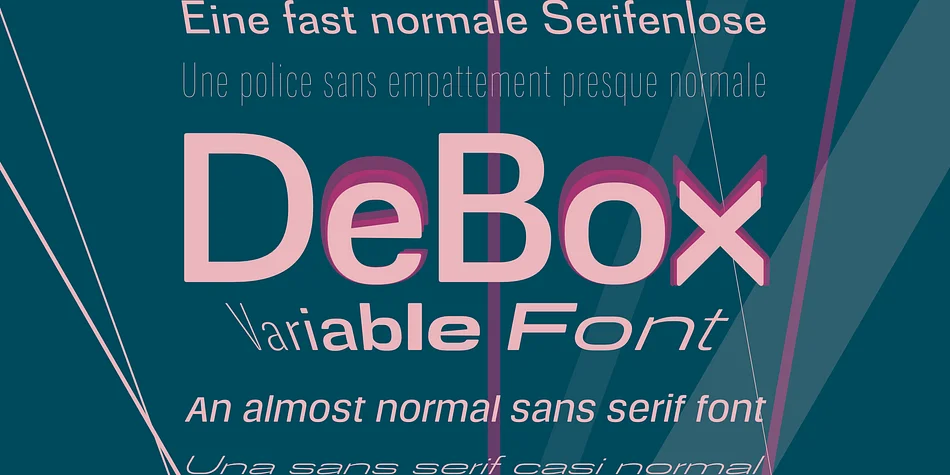
As the name DeBox suggests, the proportions and shapes in this font are a little boxy, meaning that the curves are not completely round and tend noticeably toward rectangles. The proportions are unobtrusive and based on familiar typefaces.
So it is “almost a normal sans serif” – but there are a few special features that distinguish this font from the usual well-known everyday fonts. DeBox offers some variations that are not very common.
First, in addition to the usual italics, there is the slanted version, which is inclined to the left against the reading direction. Like most modern fonts, DeBox does not have a “real” italic with the typical italic forms borrowed from handwriting – it is basically the slanted forms of the upright version (naturally balanced and corrected according to visual criteria).
Another feature is the selectable x-height of the lowercase letters. In DeBox, you can choose (while keeping the font size the same) from a very low x-height, which appears almost delicate, to a very high x-height, which appears solid and powerful.
As a variable font, DeBox offers the possibility to adjust all variations from one extreme to the other individually and continuously.
The range of font widths in DeBox includes widths from Extra Condensed to Extra Expanded.
The range of stroke weights extends from Hairline to Black.
The static fonts, on the other hand, only represent part of the diverse spectrum without the extremes.
Striking characters in DeBox are the uppercase and lowercase X with their unusual upward and downward points, and the small u with its bowl-like shape without the usual stroke on the right. The conventional character forms for X and u are available as stylistic alternates.
The corners and points at the ends of the strokes are rounded almost imperceptibly. This takes away some of the overall impression of sobriety from DeBox.
Style & Use Cases
- Overall Style
- Eye-catching, Bold
- Use Case
- Headlines, Logos
- Ideal For
- posters, branding, and social media graphics
- Pairs With
- a readable sans or serif for body
How to Install DeBox Font
Step-by-step instructions for every platform
- 1Download the DeBox font file (.ttf or .otf).
- 2Locate the downloaded file in your Downloads folder.
- 3Right-click the font file.
- 4Select "Install" to install for the current user, or "Install for all users" to make it available system-wide.
- 5DeBox is now available in Word, Photoshop, Illustrator, and all other apps.
More by ingoFonts
View all →
Browse fonts by theme
Curated collections →Saw a font in a picture? Identify any font from an image with our free Font Finder.
More Display Fonts
Browse all →







What pairs well with DeBox Font?
DeBox Font is a display font that shines as a display or heading face. Pair it with a clean sans-serif or serif font for body text — the contrast creates a clear hierarchy while the two styles stay balanced and easy to read.




DeBox Font
by ingoFonts
Reviewed by the FontBoxDL team · Updated April 2026