 Firefox
 1 / 4
1 / 4About Crazy Flowers Font
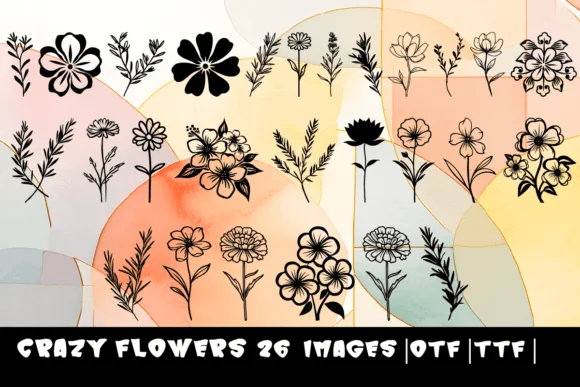
The hand-drawn floral dingbats of Crazy Flowers bring organic movement to projects that need personality without shouting. Created by MOMAT THIRTYONE, this font maps 26 whimsical botanical symbols to the standard A-Z keyboard, making floral accents feel intuitive and accessible without diving into a glyph panel or hunting through dozens of alternates. Sketched rather than polished, the letterforms read as honest and approachable on surfaces where homemade charm carries real weight: wedding invitation suites, greeting card headers, and DIY kraft packaging all benefit from this genuine aesthetic.
Scattered across scrapbooking layouts, these blooms work as visual connectors between photos and journaling blocks, or use them in Etsy shop branding to break up text-heavy product headers with natural accent points. Small-batch product labels for candles, teas, or skincare cosmetics also gain visual interest when nature-inspired illustration ties the design story together. With generous internal white space and sketchy proportions, each individual symbol reads clearly even when layered tightly or scaled small for detailed packaging work.
Available in both OTF and TTF formats, Crazy Flowers suits makers, small business owners, and hand-craft enthusiasts who want designs that feel intentional and personal rather than templated. Grab it from Creative Fabrica and start weaving these botanical accents through your next project.
Style & Use Cases
- Overall Style
- Iconographic, Flowers
- Use Case
- Icons, Accents
- Ideal For
- ornaments, bullets, and decorative flourishes
- Pairs With
- any text font
How to Install Crazy Flowers Font
Step-by-step instructions for every platform
- 1Download the Crazy Flowers font file (.ttf or .otf).
- 2Locate the downloaded file in your Downloads folder.
- 3Right-click the font file.
- 4Select "Install" to install for the current user, or "Install for all users" to make it available system-wide.
- 5Crazy Flowers is now available in Word, Photoshop, Illustrator, and all other apps.
More by MOMAT THIRTYONE
View all →



Browse fonts by theme
Curated collections →Saw a font in a picture? Identify any font from an image with our free Font Finder.
More Dingbats Fonts
Browse all →







What pairs well with Crazy Flowers Font?
Crazy Flowers Font is a versatile dingbats font that works for both headings and body text. Pair it with a contrasting sans-serif or serif font to add visual interest and a clear distinction between titles and body copy.




Crazy Flowers Font
Reviewed by the FontBoxDL team · Updated June 2026