 Firefox
 1 / 8
1 / 8Loading font…
About Cosmetic Font
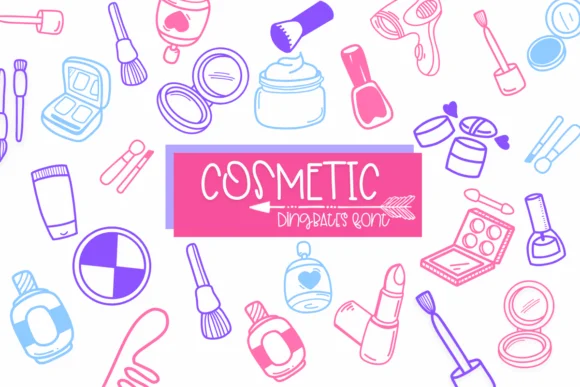
This font radiates playful charm for any project celebrating beauty and style. Cosmetic, designed by Sirinart, is a dingbats collection built around makeup and skincare imagery: mascara wands, nail polish bottles, perfume droppers, eyeliner strokes, and facial care elements rendered with a distinctive doodle-like outline aesthetic.
The clean outline style ensures each icon reads clearly whether you're working at large sizes or small applications across different media. You'll find this particularly useful for skincare product label designs, makeup tutorial graphics that need strong visual symbols, wedding invitation suites with a beauty or self-care theme, or DIY cosmetics packaging for small-batch indie brands. It's equally at home in fashion and beauty blog graphics, cosmetics brand identity work, salon signage, and Etsy shop graphics for beauty product sellers. The outline approach keeps details legible and lets colors breathe, perfect for both modern minimalist and playful maximalist aesthetics. Available in both OTF and TTF formats with full Procreate support, Cosmetic works across desktop and mobile design tools.
Pair it with a clean, minimal serif or sans-serif typeface to handle any accompanying text, letting the dingbats carry your visual storytelling. Grab Cosmetic on Creative Fabrica and start incorporating these beauty-inspired icons into your next design project.
Style & Use Cases
- Overall Style
- Iconographic, Cosmetic
- Use Case
- Icons, Accents
- Ideal For
- ornaments, bullets, and decorative flourishes
- Pairs With
- any text font
How to Install Cosmetic Font
Step-by-step instructions for every platform
- 1Download the Cosmetic font file (.ttf or .otf).
- 2Locate the downloaded file in your Downloads folder.
- 3Right-click the font file.
- 4Select "Install" to install for the current user, or "Install for all users" to make it available system-wide.
- 5Cosmetic is now available in Word, Photoshop, Illustrator, and all other apps.
More by Sirinart
View all →

Browse fonts by theme
Curated collections →Saw a font in a picture? Identify any font from an image with our free Font Finder.
More Dingbats Fonts
Browse all →







What pairs well with Cosmetic Font?
Cosmetic Font is a versatile dingbats font that works for both headings and body text. Pair it with a contrasting sans-serif or serif font to add visual interest and a clear distinction between titles and body copy.




Cosmetic Font
by Sirinart
Reviewed by the FontBoxDL team · Updated October 2026