 Firefox
 1 / 8
1 / 8About Coral Font
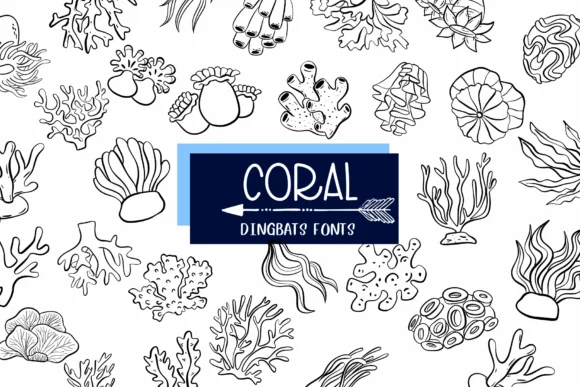
Coral is a dingbat font that captures the playful, hand-drawn energy of underwater life. Designer Sirinart created this as a collection of cartoon-style ocean symbols and creatures, rendered in a coloring-book outline style that invites creative coloration and customization. The letterforms have a loose, organic feel that reads more like illustrated doodles than typographic characters, making them ideal for adding whimsical marine touches to visual work across multiple mediums.
This font shines in specific contexts where quirky, nature-inspired ornamentation adds real value to projects. Think invitation suites with hand-drawn borders, scrapbooking layouts where underwater themes create narrative depth, greeting cards that play with sea-creature charm, or even label designs for eco-conscious skincare and artisanal product brands. Because it's available in both OTF and TTF formats, it integrates smoothly across Procreate, Affinity Designer, and other creative tools you likely already use. The outlined glyphs give you flexibility to color and shade elements however you want, treating the font almost as a design toolkit rather than a restrictive typeface.
If you're working on projects that benefit from a sense of fun and character, Coral pairs best with illustrative, DIY-focused creative work. Grab it on Creative Fabrica and start adding marine whimsy to your next piece.
Style & Use Cases
- Overall Style
- Iconographic, Fonts
- Use Case
- Icons, Accents
- Ideal For
- ornaments, bullets, and decorative flourishes
- Pairs With
- any text font
How to Install Coral Font
Step-by-step instructions for every platform
- 1Download the Coral font file (.ttf or .otf).
- 2Locate the downloaded file in your Downloads folder.
- 3Right-click the font file.
- 4Select "Install" to install for the current user, or "Install for all users" to make it available system-wide.
- 5Coral is now available in Word, Photoshop, Illustrator, and all other apps.
More by Sirinart
View all →

Browse fonts by theme
Curated collections →Saw a font in a picture? Identify any font from an image with our free Font Finder.
More Dingbats Fonts
Browse all →







What pairs well with Coral Font?
Coral Font is a versatile dingbats font that works for both headings and body text. Pair it with a contrasting sans-serif or serif font to add visual interest and a clear distinction between titles and body copy.




Coral Font
by Sirinart
Reviewed by the FontBoxDL team · Updated July 2026