 Firefox
 1 / 8
1 / 8About Coffee Time Font
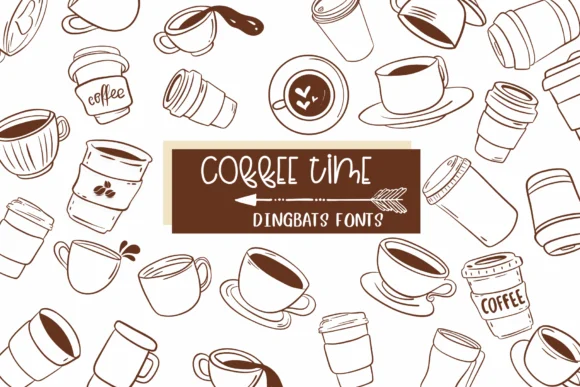
Coffee Time by Sirinart is a dingbat collection built entirely from coffee cup characters, creating a playful illustrated typeface that brings warmth and personality to beverage-focused designs. Each letter becomes a unique cup illustration, allowing you to construct entire messages and headlines using nothing but coffee-themed imagery.
This approach works exceptionally well for cafe menu boards where hand-drawn charm sets the tone, coffee subscription box labels that need to feel artisanal, and morning newsletter headers that benefit from a cozy visual accent. The retro, cartoon styling also suits coffee roaster branding and specialty cafe Instagram graphics, where that handcrafted, approachable aesthetic builds customer trust and engagement.
Since it functions as a legitimate working font rather than static artwork, you maintain complete flexibility: resize and recolor each character for social media posts, large cafe signage, or printed marketing collateral without losing clarity. The illustrative quality gives your designs an intentional, human-made feel that mass-produced templates simply cannot replicate, which matters especially in the coffee space where authenticity and craftsmanship are part of the appeal. Pick up Coffee Time on Creative Fabrica to add this charming dingbat collection to your design toolkit.
Style & Use Cases
- Overall Style
- Iconographic, Coffee Time
- Use Case
- Icons, Accents
- Ideal For
- ornaments, bullets, and decorative flourishes
- Pairs With
- any text font
How to Install Coffee Time Font
Step-by-step instructions for every platform
- 1Download the Coffee Time font file (.ttf or .otf).
- 2Locate the downloaded file in your Downloads folder.
- 3Right-click the font file.
- 4Select "Install" to install for the current user, or "Install for all users" to make it available system-wide.
- 5Coffee Time is now available in Word, Photoshop, Illustrator, and all other apps.
More by Sirinart
View all →

Browse fonts by theme
Curated collections →Saw a font in a picture? Identify any font from an image with our free Font Finder.
More Dingbats Fonts
Browse all →







What pairs well with Coffee Time Font?
Coffee Time Font is a versatile dingbats font that works for both headings and body text. Pair it with a contrasting sans-serif or serif font to add visual interest and a clear distinction between titles and body copy.




Coffee Time Font
by Sirinart
Reviewed by the FontBoxDL team · Updated July 2026