 Firefox
 1 / 8
1 / 8About Cherry Blossoms Heart Font
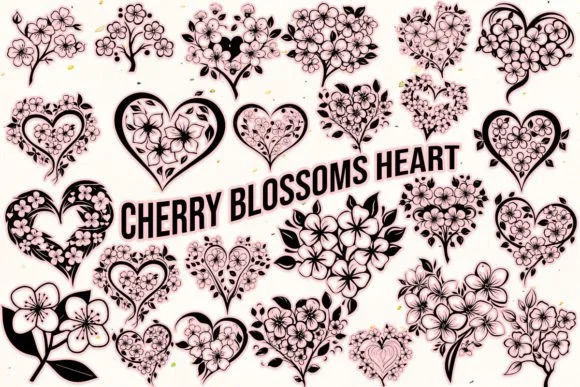
Picture yourself arranging a spring wedding suite, layering delicate floral elements across invitation cards and thank-you notes. That's where Cherry Blossoms Heart, designed by MOMAT THIRTYONE, makes an immediate impact. This dingbat font weaves together 62 ornamental characters (26 uppercase, 26 lowercase, plus digits 0 through 9) that blend cherry blossom motifs with heart shapes into one cohesive visual language. The result feels both intentional and organic, the kind of detail that catches a viewer's eye without demanding their full attention.
The font shines brightest in designs that need a soft, romantic touch without sacrificing visual interest. Wedding invitation suites, boutique greeting cards, and handmade craft labels all benefit from the intricate detail woven throughout its character set. Packaging for artisanal products, from handcrafted jewelry boxes to plant-based skincare lines, gains an instant sense of care when paired with this typeface. DIY birth announcement cards or personalized gift wrap designs gain personality and warmth from these botanical and romantic symbols. The blend of floral imagery and heart motifs keeps everything feeling fresh rather than overly sweet.
Each character holds enough visual weight to work beautifully at larger sizes while keeping its delicate quality intact. This versatility across print mediums makes it a reliable choice for any project needing that spring-inspired flourish. Grab it from Creative Fabrica and start using it in your next design.
Style & Use Cases
- Overall Style
- Iconographic, Floral Dingbats
- Use Case
- Icons, Accents
- Ideal For
- ornaments, bullets, and decorative flourishes
- Pairs With
- any text font
How to Install Cherry Blossoms Heart Font
Step-by-step instructions for every platform
- 1Download the Cherry Blossoms Heart font file (.ttf or .otf).
- 2Locate the downloaded file in your Downloads folder.
- 3Right-click the font file.
- 4Select "Install" to install for the current user, or "Install for all users" to make it available system-wide.
- 5Cherry Blossoms Heart is now available in Word, Photoshop, Illustrator, and all other apps.
More by MOMAT THIRTYONE
View all →



Browse fonts by theme
Curated collections →Saw a font in a picture? Identify any font from an image with our free Font Finder.
More Dingbats Fonts
Browse all →







What pairs well with Cherry Blossoms Heart Font?
Cherry Blossoms Heart Font is a versatile dingbats font that works for both headings and body text. Pair it with a contrasting sans-serif or serif font to add visual interest and a clear distinction between titles and body copy.




Cherry Blossoms Heart Font
Reviewed by the FontBoxDL team · Updated July 2026