 Firefox
 1 / 8
1 / 8About Chat Sticker Font
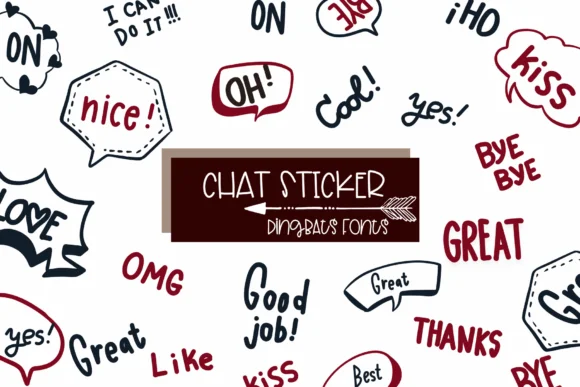
Picture yourself building a visual language for a greeting card, a social media template, or an app mockup, something that needs a friendly voice built directly into the design itself. Chat Sticker, designed by Sirinart, is a dingbats font made entirely of sketched speech bubbles, chat balloons, and conversation elements ready to drop straight into your layouts. No hunting for separate graphics; these talking points fit directly into whatever you're building.
This dingbat set shines in product packaging label designs, scrapbooking layouts with room for journaling, mobile app UI sketches, and DIY greeting card suites. The sketched, hand-drawn style gives each bubble and balloon a conversational, approachable quality that works beautifully on sticker sheets, chat bubble overlays for photography projects, and anywhere else a bit of dialogue feels right. You can build entire visual systems around these elements, especially when designing message icons for websites or assembling sticker packs for both digital and print distribution.
The sketchy linework stays legible at smaller sizes and scales beautifully for poster-sized applications. Grab Chat Sticker from Creative Fabrica and begin working these conversation elements into your designs.
Style & Use Cases
- Overall Style
- Iconographic, Chat Sticker
- Use Case
- Icons, Accents
- Ideal For
- ornaments, bullets, and decorative flourishes
- Pairs With
- any text font
How to Install Chat Sticker Font
Step-by-step instructions for every platform
- 1Download the Chat Sticker font file (.ttf or .otf).
- 2Locate the downloaded file in your Downloads folder.
- 3Right-click the font file.
- 4Select "Install" to install for the current user, or "Install for all users" to make it available system-wide.
- 5Chat Sticker is now available in Word, Photoshop, Illustrator, and all other apps.
More by Sirinart
View all →
Browse fonts by theme
Curated collections →Saw a font in a picture? Identify any font from an image with our free Font Finder.
More Dingbats Fonts
Browse all →






What pairs well with Chat Sticker Font?
Chat Sticker Font is a versatile dingbats font that works for both headings and body text. Pair it with a contrasting sans-serif or serif font to add visual interest and a clear distinction between titles and body copy.




Chat Sticker Font
by Sirinart
Reviewed by the FontBoxDL team · Updated July 2026