 Firefox
 1 / 8
1 / 8About Butterfly Dreamscape Font
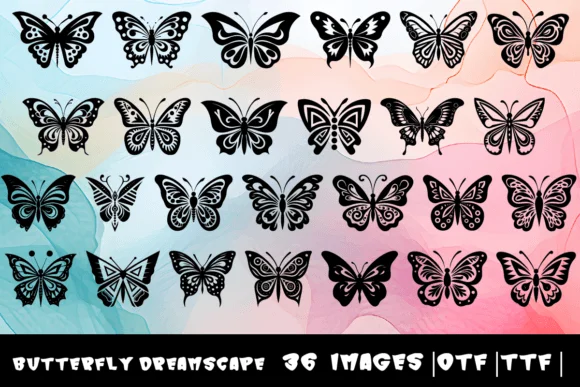
Butterfly Dreamscape by MOMAT THIRTYONE is a dingbat collection that replaces standard letters with winged creatures. Instead of typing typical characters, you get 26 unique butterfly glyphs plus a bonus character, turning any text block into a decorative element. This works beautifully for wedding invitation suites where you need ornamental borders or flourishes that feel handcrafted, or for DIY scrapbooking layouts where butterfly accents add visual dimension without requiring extra graphics or image files. Boutique product labels, especially for soap, tea, or natural skincare brands, come alive with these character-based ornaments. Greeting cards and spring event materials equally benefit from having a full butterfly palette built directly into the typeface.
The real strength here is how it functions as both text and graphic simultaneously. Pull it into your design software and you're not limited to a single butterfly shape; each letter position offers distinct variation, letting you build custom patterns or scattered arrangements for borders and backgrounds. Nature journal illustrations and children's storybook headers gain immediate character from this font without needing additional graphic assets. Since it works through standard keyboard input, there's no need to hunt for separate image files or layering multiple graphics. Pick up Butterfly Dreamscape on Creative Fabrica and start transforming typed text into richly decorated design elements.
Style & Use Cases
- Overall Style
- Iconographic, Dingbats Fonts Butterfly
- Use Case
- Icons, Accents
- Ideal For
- ornaments, bullets, and decorative flourishes
- Pairs With
- any text font
How to Install Butterfly Dreamscape Font
Step-by-step instructions for every platform
- 1Download the Butterfly Dreamscape font file (.ttf or .otf).
- 2Locate the downloaded file in your Downloads folder.
- 3Right-click the font file.
- 4Select "Install" to install for the current user, or "Install for all users" to make it available system-wide.
- 5Butterfly Dreamscape is now available in Word, Photoshop, Illustrator, and all other apps.
More by MOMAT THIRTYONE
View all →



Browse fonts by theme
Curated collections →Saw a font in a picture? Identify any font from an image with our free Font Finder.
More Dingbats Fonts
Browse all →







What pairs well with Butterfly Dreamscape Font?
Butterfly Dreamscape Font is a versatile dingbats font that works for both headings and body text. Pair it with a contrasting sans-serif or serif font to add visual interest and a clear distinction between titles and body copy.




Butterfly Dreamscape Font
Reviewed by the FontBoxDL team · Updated July 2026