 Firefox
 1 / 6
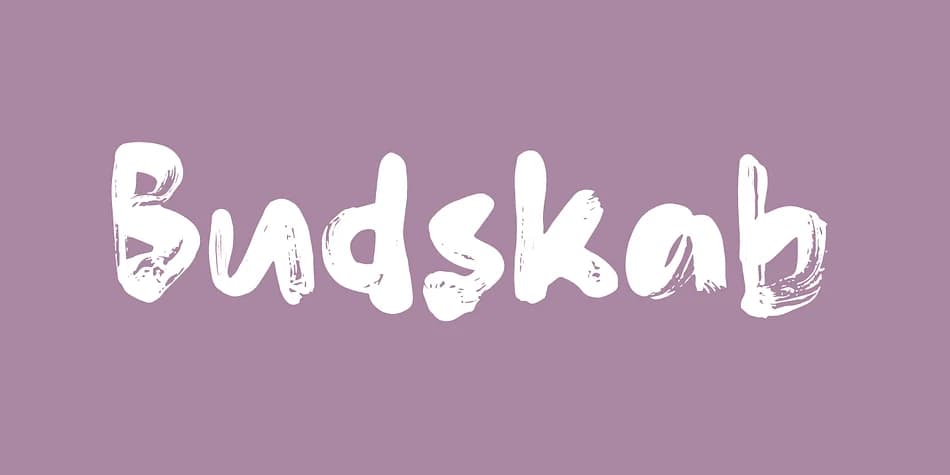
1 / 6About Budskab Font
Budskab by Bogstav is a playful display font with authentic handmade character and built-in unpredictability. The typeface features five distinct letterforms for each character, so typing the same word twice produces visibly different results every time you use it. This shifting quality means every line feels alive and fresh, capturing that human imperfection and spontaneity that polished digital fonts struggle to convey. It reads as if drawn with actual hands and genuine humor, rather than constructed and optimized inside design software to look sterile.
The unpredictability makes Budskab especially effective for greeting card suites where warmth and personality matter far more than geometric precision. Indie product packaging, particularly food labels and artisanal craft supply branding, gains character from its friendly, approachable aesthetic. Comic book lettering and illustrated children's books are natural fits for its bouncy energy. Event posters and social media graphics benefit tremendously from this jittery, never-quite-the-same quality that catches viewers and feels reassuringly human. DIY sticker designs and quirky brand identity projects thrive with its unpredictable charm. Since "budskab" is Danish for message, there's an elegant fit to using it for any communication-focused creative work where personality actually counts.
Grab Budskab on Creative Fabrica to inject character into your next design project.
Style & Use Cases
- Overall Style
- Eye-catching, Bold
- Use Case
- Headlines, Logos
- Ideal For
- posters, branding, and social media graphics
- Pairs With
- a readable sans or serif for body
How to Install Budskab Font
Step-by-step instructions for every platform
- 1Download the Budskab font file (.ttf or .otf).
- 2Locate the downloaded file in your Downloads folder.
- 3Right-click the font file.
- 4Select "Install" to install for the current user, or "Install for all users" to make it available system-wide.
- 5Budskab is now available in Word, Photoshop, Illustrator, and all other apps.


Browse fonts by theme
Curated collections →Saw a font in a picture? Identify any font from an image with our free Font Finder.
More Display Fonts
Browse all →







What pairs well with Budskab Font?
Budskab Font is a display font that shines as a display or heading face. Pair it with a clean sans-serif or serif font for body text — the contrast creates a clear hierarchy while the two styles stay balanced and easy to read.



Budskab Font
by Bogstav
Reviewed by the FontBoxDL team · Updated June 2026