 Firefox
 1 / 4
1 / 4About Bright Stars Font
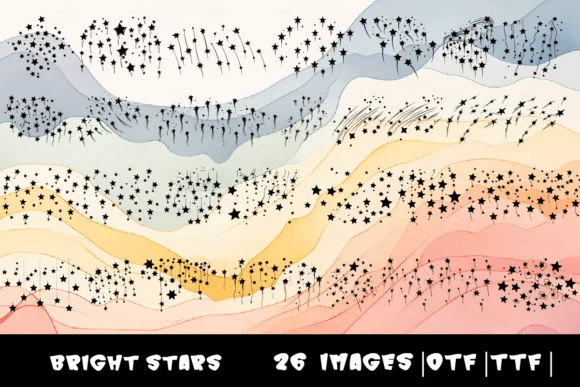
Each character in Bright Stars, designed by MOMAT THIRTYONE, transforms into a star or celestial shape when you type A through Z. This dingbat font replaces your keyboard input with intricate starry forms, available in both OTF and TTF formats for use across your entire design toolkit.
The real strength lies in speed and versatility when you need cosmic flair. Add starry elements instantly to greeting card borders, framing for children's lesson titles, and space-themed event invitations without hunting through libraries for additional graphics. Scrapbookers gain an ethereal accent that brings page layouts to life with just a few keystrokes, while creators of celestial-inspired product packaging (skincare labels, gift tags, stickers, wall decals) get ready-made decorative elements at their fingertips. Website designers appreciate how a row of these characters can break up sections with visual interest and personality, creating natural focal points that guide the viewer's attention between content blocks.
Best suited to projects built around astronomy or nighttime themes, Bright Stars works equally well for professional and personal work alike. Grab it on Creative Fabrica and start bringing cosmic starlight to your designs.
Style & Use Cases
- Overall Style
- Iconographic, Stars
- Use Case
- Icons, Accents
- Ideal For
- ornaments, bullets, and decorative flourishes
- Pairs With
- any text font
How to Install Bright Stars Font
Step-by-step instructions for every platform
- 1Download the Bright Stars font file (.ttf or .otf).
- 2Locate the downloaded file in your Downloads folder.
- 3Right-click the font file.
- 4Select "Install" to install for the current user, or "Install for all users" to make it available system-wide.
- 5Bright Stars is now available in Word, Photoshop, Illustrator, and all other apps.
More by MOMAT THIRTYONE
View all →



Browse fonts by theme
Curated collections →Saw a font in a picture? Identify any font from an image with our free Font Finder.
More Dingbats Fonts
Browse all →







What pairs well with Bright Stars Font?
Bright Stars Font is a versatile dingbats font that works for both headings and body text. Pair it with a contrasting sans-serif or serif font to add visual interest and a clear distinction between titles and body copy.




Bright Stars Font
Reviewed by the FontBoxDL team · Updated July 2026