 Firefox
 1 / 4
1 / 4About Blossom Whisper Flower Font
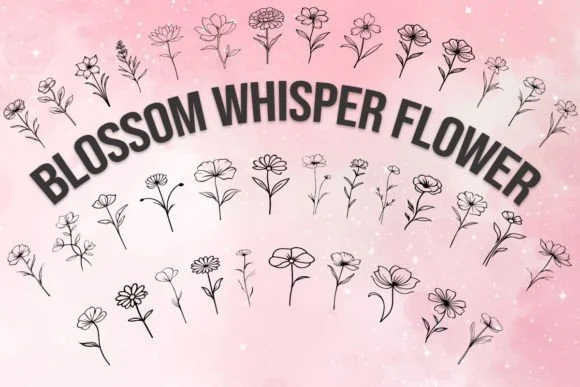
These botanical symbols feel handpicked from a vintage sketchbook, carrying the quiet charm of real pressed flowers. Blossom Whisper Flower by MOMAT THIRTYONE is a dingbats collection where every character becomes a usable floral element. Individual blooms, layered petals, and botanical accents let you build compositions that feel organic rather than rigid.
Wedding invitation suites benefit immediately from this kind of natural detail. The same goes for nature-themed product labels if you're selling on Etsy, botanical illustration markers for scientific or gardening content, and DIY pressed flower craft projects where handmade character matters. Since it's built entirely from floral symbols rather than traditional letters, you're not constrained by letter forms. Instead you layer, rotate, and arrange these elements to create something genuinely personal. That freedom is what makes symbol fonts so useful for designers who want to move beyond templates.
Pair this collection with a clean sans-serif like Montserrat for your body text, letting the flowers provide visual interest while the sans-serif keeps content readable. The collection shines brightest in designs that have room to breathe, where botanical beauty is the point rather than a decoration added on top. Grab Blossom Whisper Flower on Creative Fabrica to start exploring what these blooms can do in your next project.
Style & Use Cases
- Overall Style
- Iconographic, Flowers
- Use Case
- Icons, Accents
- Ideal For
- ornaments, bullets, and decorative flourishes
- Pairs With
- any text font
How to Install Blossom Whisper Flower Font
Step-by-step instructions for every platform
- 1Download the Blossom Whisper Flower font file (.ttf or .otf).
- 2Locate the downloaded file in your Downloads folder.
- 3Right-click the font file.
- 4Select "Install" to install for the current user, or "Install for all users" to make it available system-wide.
- 5Blossom Whisper Flower is now available in Word, Photoshop, Illustrator, and all other apps.
More by MOMAT THIRTYONE
View all →



Browse fonts by theme
Curated collections →Saw a font in a picture? Identify any font from an image with our free Font Finder.
More Dingbats Fonts
Browse all →







What pairs well with Blossom Whisper Flower Font?
Blossom Whisper Flower Font is a versatile dingbats font that works for both headings and body text. Pair it with a contrasting sans-serif or serif font to add visual interest and a clear distinction between titles and body copy.




Blossom Whisper Flower Font
Reviewed by the FontBoxDL team · Updated June 2026