 Firefox
 1 / 6
1 / 6About Beautiful Shooting Star Font
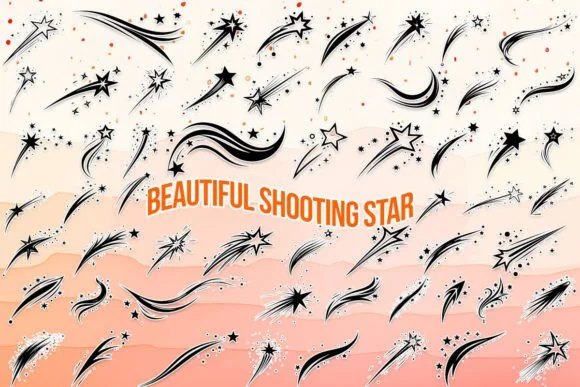
Picture yourself designing a wedding invitation suite, and you reach for Beautiful Shooting Star, the dingbats font by MOMAT THIRTYONE. This one fills a real gap that most decorative fonts leave open. Instead of hunting through multiple collections for constellation elements and cosmic motifs, you get 62 carefully chosen symbols built specifically for celestial and space-themed work. Stars in various styles, astronomical icons, and night-sky elements sit ready in both uppercase and lowercase characters, plus ten numeral variants that follow the same cosmic aesthetic.
The practical side matters here. Use these symbols for astrology-themed branding packages, detailed constellation illustrations in children's books, or decorative night-sky elements in greeting card suites. Scrapbooking layouts benefit enormously from having a full set of space symbols at your fingertips, and the icons perform equally well at small sizes for product labels or enlarged dramatically for wall art and vinyl lettering projects. Each character reads with clarity whether you're working at 12 points or 120.
The font's genuine strength is replacing that tedious manual workflow of copying and pasting star graphics throughout your projects. You'll find it on Creative Fabrica, ready to drop into your design files and deliver consistent results immediately.
Style & Use Cases
- Overall Style
- Iconographic, Shooting Star
- Use Case
- Icons, Accents
- Ideal For
- ornaments, bullets, and decorative flourishes
- Pairs With
- any text font
How to Install Beautiful Shooting Star Font
Step-by-step instructions for every platform
- 1Download the Beautiful Shooting Star font file (.ttf or .otf).
- 2Locate the downloaded file in your Downloads folder.
- 3Right-click the font file.
- 4Select "Install" to install for the current user, or "Install for all users" to make it available system-wide.
- 5Beautiful Shooting Star is now available in Word, Photoshop, Illustrator, and all other apps.
More by MOMAT THIRTYONE
View all →



Browse fonts by theme
Curated collections →Saw a font in a picture? Identify any font from an image with our free Font Finder.
More Dingbats Fonts
Browse all →







What pairs well with Beautiful Shooting Star Font?
Beautiful Shooting Star Font is a versatile dingbats font that works for both headings and body text. Pair it with a contrasting sans-serif or serif font to add visual interest and a clear distinction between titles and body copy.




Beautiful Shooting Star Font
Reviewed by the FontBoxDL team · Updated July 2026