 Firefox
 1 / 3
1 / 3About Aura Feather Font
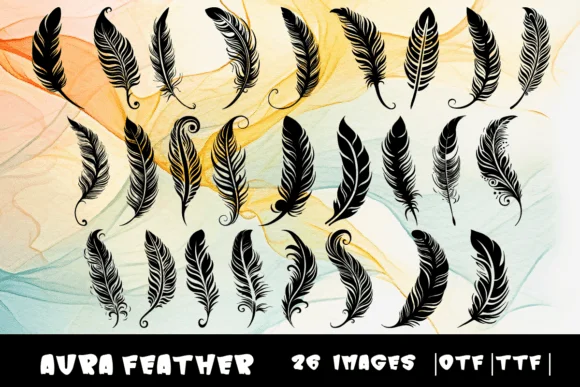
Each character in Aura Feather morphs into a delicate feather form, creating a dingbat set that feels organic and weightless. Designer MOMAT THIRTYONE crafted these 26 letterforms (A to Z) with a soft, flowing quality that radiates grace and movement. Available in both OTF and TTF formats, the font integrates smoothly into most design applications. The overall character set gives you room to play with ornamental borders, decorative headers, and symbolic elements that don't demand the visual heaviness of traditional display fonts.
This typeface shines in boho wedding invitations and stationery suites, nature-inspired product labeling for boutique brands, wellness and spa identity systems, and handmade Etsy shop graphics. Scrapbooking layouts come alive with the whimsical plume shapes, which bring visual interest without overwhelming the composition. Greeting card designs benefit from the feather motifs as accent elements or border treatments. Each feather carries enough detail to feel intentional at larger display sizes while remaining elegant and restrained when used smaller. The softness of the letterforms suits seasonal event designs, craft project covers, and anything calling for an artistic, nature-forward sensibility.
Aura Feather works best for projects where a touch of ethereal, graceful ornament sets your work apart from more conventional designs. Pick it up on Creative Fabrica and let these delicate plume shapes bring soft, nature-inspired character to your brand identity and project work.
Style & Use Cases
- Overall Style
- Iconographic, Feathers
- Use Case
- Icons, Accents
- Ideal For
- ornaments, bullets, and decorative flourishes
- Pairs With
- any text font
How to Install Aura Feather Font
Step-by-step instructions for every platform
- 1Download the Aura Feather font file (.ttf or .otf).
- 2Locate the downloaded file in your Downloads folder.
- 3Right-click the font file.
- 4Select "Install" to install for the current user, or "Install for all users" to make it available system-wide.
- 5Aura Feather is now available in Word, Photoshop, Illustrator, and all other apps.
More by MOMAT THIRTYONE
View all →



Browse fonts by theme
Curated collections →Saw a font in a picture? Identify any font from an image with our free Font Finder.
More Dingbats Fonts
Browse all →







What pairs well with Aura Feather Font?
Aura Feather Font is a versatile dingbats font that works for both headings and body text. Pair it with a contrasting sans-serif or serif font to add visual interest and a clear distinction between titles and body copy.




Aura Feather Font
Reviewed by the FontBoxDL team · Updated July 2026