 Firefox
 1 / 10
About ATOMIC Font
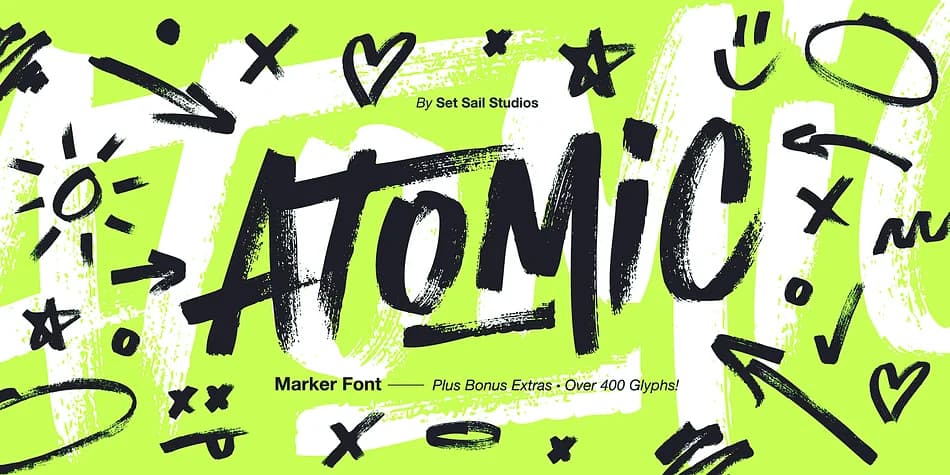
ATOMIC has the raw energy of a marker dragged across cardboard. Set Sail Studios created this all-caps display font by hand-drawing with real acrylic markers, preserving every brushstroke's texture and pressure variation. Bold, unrefined, genuinely tactile.
Use it for album artwork and cover design where the typography carries the visual weight. Concert poster design benefits from this kind of hand-drawn authority. Energy drink packaging labels, skateboard graphics, and festival merchandise branding all thrive with this font's confident marker personality. Sports and action brands especially resonate with the authentic texture here. The typeface works at any size without losing character.
Technically, ATOMIC Marker ships with two alternate uppercase character sets (swap between them via the keyboard), 18 ligatures for paired letters, and six small-caps options. Access everything through standard ligatures and small-caps features or use the Glyphs panel. A companion font, ATOMIC Marker Extras, bundles 26 doodles and 23 underline variations designed to work directly with the main letters. International support covers 23 languages spanning Romance, Germanic, Baltic, and Slavic regions. Combine ATOMIC with a clean, quiet sans-serif when you need body text in the same layout. Grab it from Creative Fabrica and bring real texture and grit to your next design project.
Style & Use Cases
- Overall Style
- Eye-catching, Bold
- Use Case
- Headlines, Logos
- Ideal For
- posters, branding, and social media graphics
- Pairs With
- a readable sans or serif for body
How to Install ATOMIC Font
Step-by-step instructions for every platform
- 1Download the ATOMIC font file (.ttf or .otf).
- 2Locate the downloaded file in your Downloads folder.
- 3Right-click the font file.
- 4Select "Install" to install for the current user, or "Install for all users" to make it available system-wide.
- 5ATOMIC is now available in Word, Photoshop, Illustrator, and all other apps.
More by Set Sail Studios
View all →

Browse fonts by theme
Curated collections →Saw a font in a picture? Identify any font from an image with our free Font Finder.
More Display Fonts
Browse all →







What pairs well with ATOMIC Font?
ATOMIC Font is a display font that shines as a display or heading face. Pair it with a clean sans-serif or serif font for body text — the contrast creates a clear hierarchy while the two styles stay balanced and easy to read.



ATOMIC Font
Reviewed by the FontBoxDL team · Updated June 2026