
 1 / 10
About Adam Font
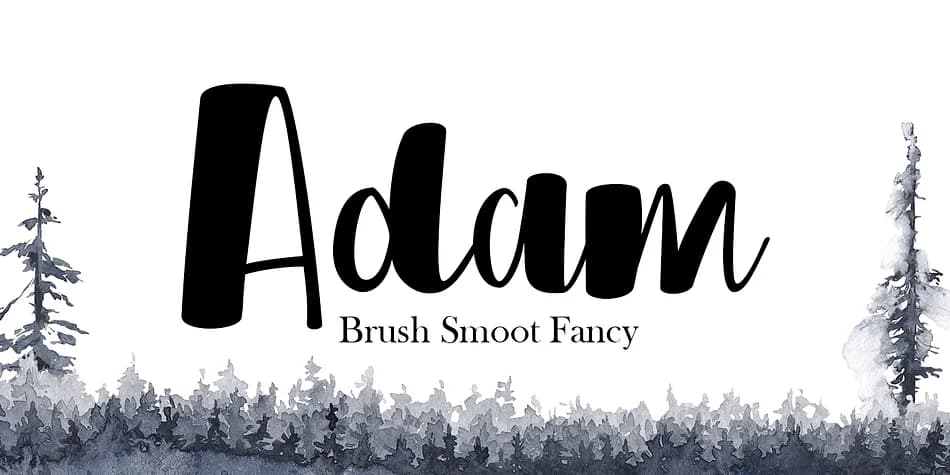
Imagine designing a wedding invitation suite where elegance and personality matter equally. Adam, created by Genesislab, is a handwritten script that blends flowing calligraphy with a contemporary edge. It's the kind of typeface that reads as intentionally crafted rather than digitized, making it ideal for luxury cosmetics packaging, upscale restaurant menus, and boutique brand identity work.
The font includes OpenType features like Stylistic Alternatives and Contextual Alternatives, giving you multiple character variations to customize letter pairings throughout your design. This mix-and-match capability means you can create more natural, less repetitive letterforms across entire projects. Wedding invitation suites, high-end product labels, and personalized greeting cards all benefit from this level of typographic control. The alternates let you build genuine warmth and fluidity into every piece of text. You'll get both OTF and TTF files, fully compatible with Adobe Illustrator, InDesign, Corel Draw, and Microsoft Word.
Use Adam at large sizes where its calligraphic flow truly shines, and the alternates will give your work that authentic hand-lettered quality. Add it to your Creative Fabrica library and you'll have a versatile script ready for your next luxury branding project or special occasion design.
Style & Use Cases
- Overall Style
- Elegant, Flowing
- Use Case
- Invitations, Branding
- Ideal For
- wedding stationery, greeting cards, and signatures
- Pairs With
- a simple uppercase sans
How to Install Adam Font
Step-by-step instructions for every platform
- 1Download the Adam font file (.ttf or .otf).
- 2Locate the downloaded file in your Downloads folder.
- 3Right-click the font file.
- 4Select "Install" to install for the current user, or "Install for all users" to make it available system-wide.
- 5Adam is now available in Word, Photoshop, Illustrator, and all other apps.
More by Genesislab
View all →
More Script Handwritten Fonts
Browse all →







What pairs well with Adam Font?
Adam Font is a script font that shines as a display or heading face. Pair it with a clean sans-serif or serif font for body text — the contrast creates a clear hierarchy while the two styles stay balanced and easy to read.



Adam Font
by Genesislab
Reviewed by the FontBoxDL team · Updated July 2026