 Firefox
 1 / 10
About Belanda Font
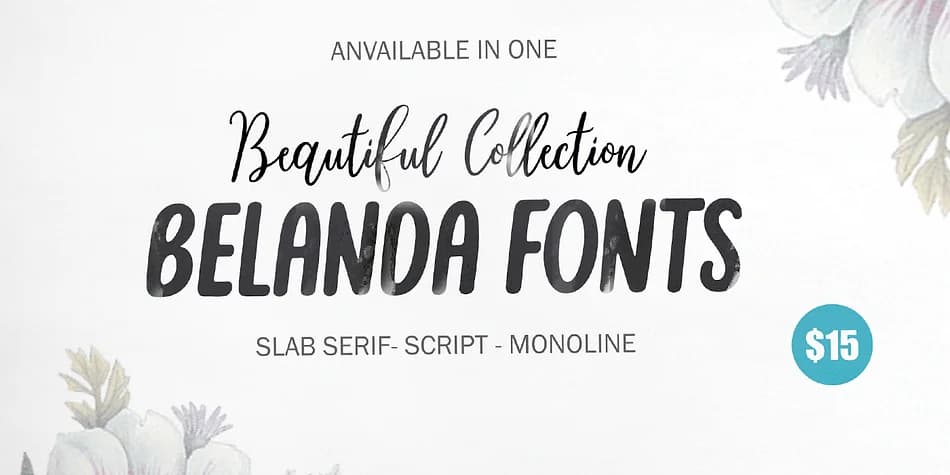
Belanda Font by Genesislab is a brush script family that brings together multiple personalities within one cohesive collection. Rather than being a single typeface, it's built as a flexible system: you get brushy letterforms with genuine hand-drawn texture, monoline scripts for moments when you need clarity, and slab serif versions that add weight and structure. Having all these options in one family means you can stay visually consistent while adapting to different project requirements.
The brush styles shine on wedding invitation suites, where the natural flow and texture create real warmth and personality. Turn to the monoline version when you're working on greeting cards or luxury packaging for cosmetics and artisanal goods. The slab serifs handle other needs well: business cards that need some authority, event signage where readability matters, and poster-scale lettering for brand identity work. You could even use the different styles within a single project to create visual hierarchy without pulling in unrelated fonts.
What sets this collection apart is how it lets you work within a unified aesthetic while still having genuine stylistic range. Each weight and style works independently but looks intentional together. Grab Belanda Font from Creative Fabrica and explore what the different styles can do for your next project.
Style & Use Cases
- Overall Style
- Elegant, Flowing
- Use Case
- Invitations, Branding
- Ideal For
- wedding stationery, greeting cards, and signatures
- Pairs With
- a simple uppercase sans
How to Install Belanda Font Font
Step-by-step instructions for every platform
- 1Download the Belanda Font font file (.ttf or .otf).
- 2Locate the downloaded file in your Downloads folder.
- 3Right-click the font file.
- 4Select "Install" to install for the current user, or "Install for all users" to make it available system-wide.
- 5Belanda Font is now available in Word, Photoshop, Illustrator, and all other apps.
More by Genesislab
View all →
Browse fonts by theme
Curated collections →Saw a font in a picture? Identify any font from an image with our free Font Finder.
More Script Handwritten Fonts
Browse all →







What pairs well with Belanda Font?
Belanda Font is a script font that shines as a display or heading face. Pair it with a clean sans-serif or serif font for body text — the contrast creates a clear hierarchy while the two styles stay balanced and easy to read.



Belanda Font
by Genesislab
Reviewed by the FontBoxDL team · Updated July 2026