 Firefox
 1 / 2
1 / 2About Abigail Font
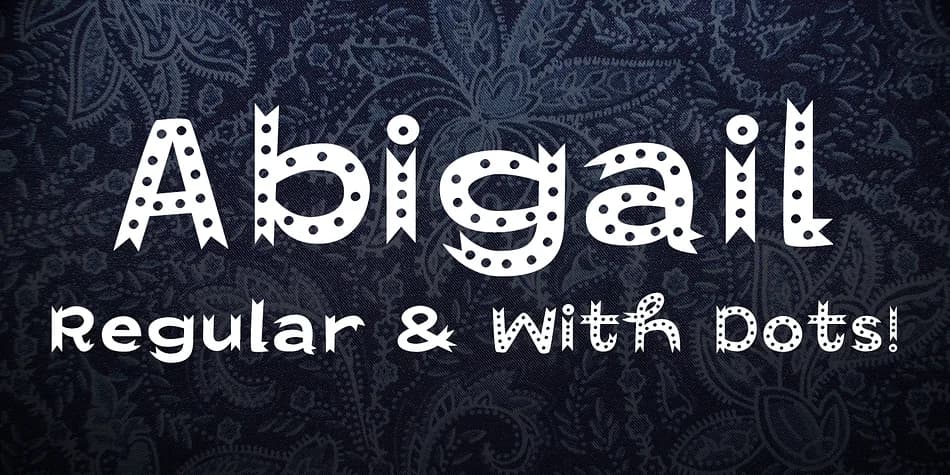
Whimsical yet genuinely sophisticated, Abigail by Fonthead Design carries a flowing, ribbon-like quality that manages to feel playful without sacrificing real polish. The soft, organic letterforms give contemporary headlines an informal warmth while maintaining excellent legibility and visual impact across all sizes. There's something inherently approachable about this typeface that makes viewers respond to it as both thoroughly modern and carefully considered in its design approach.
This font excels in greeting card suites, wedding invitation designs, and boutique product packaging where personality and visual charm drive the entire presentation. Event posters, DIY craft signage, and social media graphics that need to grab attention all benefit from Abigail's distinctive voice and character. The font comes in two versions: clean letterforms and a dots variant that layers in extra dimension and visual texture without compromising readability. This flexibility means you can deploy both versions within a single design system, adapting the style across different sections and building visual interest that feels considered rather than chaotic.
Pair Abigail with a straightforward, minimal sans-serif for any body text, letting your display copy and headline work take the spotlight. You'll find it on Creative Fabrica, ready to bring movement and personality to your next project.
Style & Use Cases
- Overall Style
- Eye-catching, Bold
- Use Case
- Headlines, Logos
- Ideal For
- posters, branding, and social media graphics
- Pairs With
- a readable sans or serif for body
How to Install Abigail Font
Step-by-step instructions for every platform
- 1Download the Abigail font file (.ttf or .otf).
- 2Locate the downloaded file in your Downloads folder.
- 3Right-click the font file.
- 4Select "Install" to install for the current user, or "Install for all users" to make it available system-wide.
- 5Abigail is now available in Word, Photoshop, Illustrator, and all other apps.
More by Fonthead Design
View all →

Browse fonts by theme
Curated collections →Saw a font in a picture? Identify any font from an image with our free Font Finder.
More Display Fonts
Browse all →







What pairs well with Abigail Font?
Abigail Font is a display font that shines as a display or heading face. Pair it with a clean sans-serif or serif font for body text — the contrast creates a clear hierarchy while the two styles stay balanced and easy to read.



Abigail Font
Reviewed by the FontBoxDL team · Updated September 2026