 Firefox
 1 / 2
1 / 2About Zoning Department JNL Font
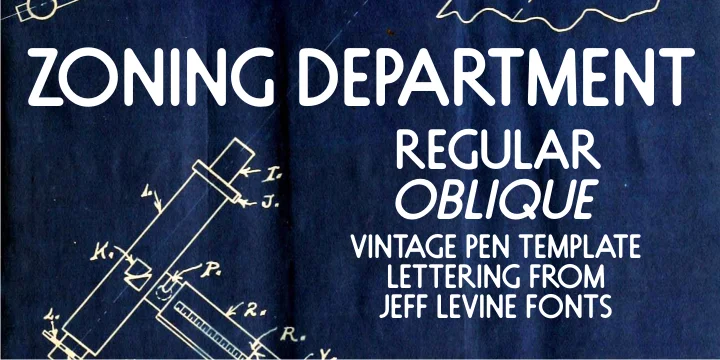
Zoning Department JNL by Jeff Levine Fonts is a rounded geometric typeface drawn directly from authentic 1930s sign-crafting conventions. The design takes its character from a commercial lettering template set that Wrico (The Wright-Regan Instrument Company) manufactured for the National Carbon Company, perfectly capturing the era's pragmatic yet distinctly charming sensibility that graced hand-painted storefront signage and technical drawings throughout that period.
The typeface handles vintage architectural drawing labels, retro diner signage and menus, and art deco-inspired product packaging with genuine character and warmth. Its soft, rounded terminals read as approachable and friendly without sacrificing legibility or visual punch. The design works equally well for packaging mockups, decorative heading treatments, and display applications where period authenticity carries real weight. Boutique record labels and craft brewery packaging immediately gain credibility from its commercial heritage, as do speakeasy-style restaurant menus, vintage travel poster layouts, and those charming DIY shop sign concepts that need genuine grounding in authentic 20th-century commercial lettering traditions.
This reliable typeface brings authentic vintage polish to any project demanding character rooted in real commercial history rather than vague nostalgia. The rounded geometry makes it approachable for a wide range of scales and applications. Get it from Creative Fabrica and add this hardworking typeface to your design arsenal.
Style & Use Cases
- Overall Style
- Bold, Distinctive
- Use Case
- Headlines, Posters
- Ideal For
- logos, packaging, and standout titles
- Pairs With
- a neutral sans-serif
How to Install Zoning Department JNL Font
Step-by-step instructions for every platform
- 1Download the Zoning Department JNL font file (.ttf or .otf).
- 2Locate the downloaded file in your Downloads folder.
- 3Right-click the font file.
- 4Select "Install" to install for the current user, or "Install for all users" to make it available system-wide.
- 5Zoning Department JNL is now available in Word, Photoshop, Illustrator, and all other apps.
More by Jeff Levine Fonts
View all →



Browse fonts by theme
Curated collections →Saw a font in a picture? Identify any font from an image with our free Font Finder.
More Decorative Fonts
Browse all →







What pairs well with Zoning Department JNL Font?
Zoning Department JNL Font is a decorative font that shines as a display or heading face. Pair it with a clean sans-serif or serif font for body text — the contrast creates a clear hierarchy while the two styles stay balanced and easy to read.




Zoning Department JNL Font
Reviewed by the FontBoxDL team · Updated July 2026