
 1 / 6
1 / 6About Winteradiva Font
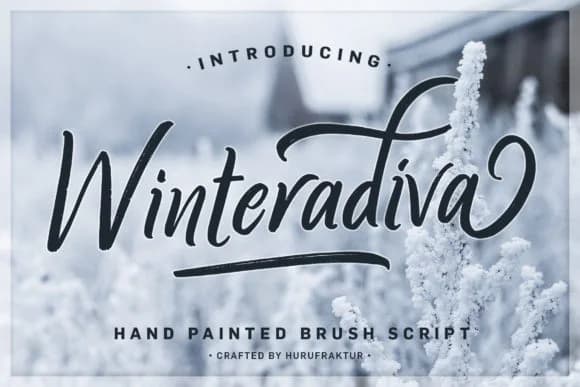
Winteradiva by hurufraktur is a flowing script that captures the elegance of frost and snowfall. The letterforms move with a graceful, organic energy, bringing warmth to designs that might otherwise feel cold and minimal.
This typeface shines in luxury holiday packaging, winter wedding invitations, and hand-lettered gift tags where a personal touch matters. The swash details add character without overwhelming layouts. Boutique skincare brands and craft product lines often choose scripts like this because they communicate both care and refinement. Winteradiva also works beautifully across seasonal campaigns, greeting card sets, and high-end bakery branding where the audience expects something thoughtfully considered rather than mass-produced.
Beyond its obvious winter applications, the script functions as a sophisticated choice for any design needing refined movement and warmth. Even at smaller sizes, the letterforms stay clear, and the generous swash components give you flexibility in how prominent you want the design to feel. Use it for everything from a single headline to a complete brand system. This font delivers personality without overstepping. Grab Winteradiva on Creative Fabrica to add its graceful strokes to your next project.
Style & Use Cases
- Overall Style
- Elegant, Flowing, Winteradiva
- Use Case
- Invitations, Branding
- Ideal For
- wedding stationery, greeting cards, and signatures
- Pairs With
- a simple uppercase sans
How to Install Winteradiva Font Font
Step-by-step instructions for every platform
- 1Download the Winteradiva Font font file (.ttf or .otf).
- 2Locate the downloaded file in your Downloads folder.
- 3Right-click the font file.
- 4Select "Install" to install for the current user, or "Install for all users" to make it available system-wide.
- 5Winteradiva Font is now available in Word, Photoshop, Illustrator, and all other apps.
More by hurufraktur
View all →

More Script Handwritten Fonts
Browse all →







What pairs well with Winteradiva Font?
Winteradiva Font is a script font that shines as a display or heading face. Pair it with a clean sans-serif or serif font for body text — the contrast creates a clear hierarchy while the two styles stay balanced and easy to read.



Winteradiva Font
by hurufraktur
Reviewed by the FontBoxDL team · Updated September 2026