 Firefox
 1 / 8
1 / 8About Winter Font
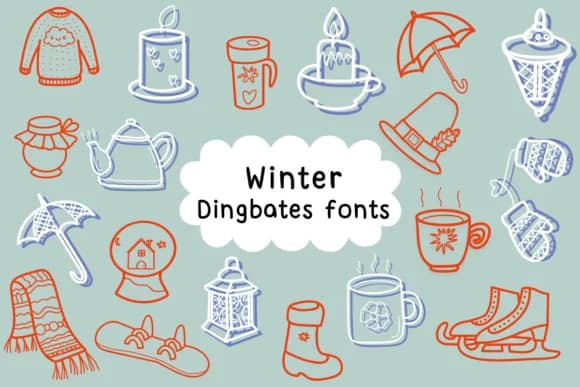
When you're laying out a holiday greeting card suite and need icons that feel hand-drawn and playful rather than polished, Winter from designer Natchuta delivers exactly that energy. This dingbat font packs a library of winter imagery: snowflakes in various shapes, chunky snowmen, decorated evergreens, scarves, mittens, and other seasonal symbols rendered as individual characters you can mix into your designs.
One great advantage of dingbats is they work like building blocks. You can use them for custom greeting card suites, festive gift tag and label designs, holiday coloring book pages and activity sheets, or designing sticker collections for Etsy and craft shops. Since it's built as a proper character font rather than a collection of separate graphics, you can swap individual symbols in and out without needing a design editor or mastering complex layering. Outlines are bold enough to read at small sizes and work equally well when enlarged for standalone decorative use, whether you're printing on cardstock or designing within Procreate and Affinity apps.
Winter comes in outline style, making it particularly useful if you want to add color fills, gradients, or hand-painted effects after placing the characters. Find this playful collection on Creative Fabrica and bring genuine seasonal character to your work.
Style & Use Cases
- Overall Style
- Iconographic, Fonts
- Use Case
- Icons, Accents
- Ideal For
- ornaments, bullets, and decorative flourishes
- Pairs With
- any text font
How to Install Winter Font
Step-by-step instructions for every platform
- 1Download the Winter font file (.ttf or .otf).
- 2Locate the downloaded file in your Downloads folder.
- 3Right-click the font file.
- 4Select "Install" to install for the current user, or "Install for all users" to make it available system-wide.
- 5Winter is now available in Word, Photoshop, Illustrator, and all other apps.

Browse fonts by theme
Curated collections →Saw a font in a picture? Identify any font from an image with our free Font Finder.
More Dingbats Fonts
Browse all →







What pairs well with Winter Font?
Winter Font is a versatile dingbats font that works for both headings and body text. Pair it with a contrasting sans-serif or serif font to add visual interest and a clear distinction between titles and body copy.



Winter Font
by Natchuta
Reviewed by the FontBoxDL team · Updated July 2026