 Firefox
About WINDOW TREATMENT JNL Font
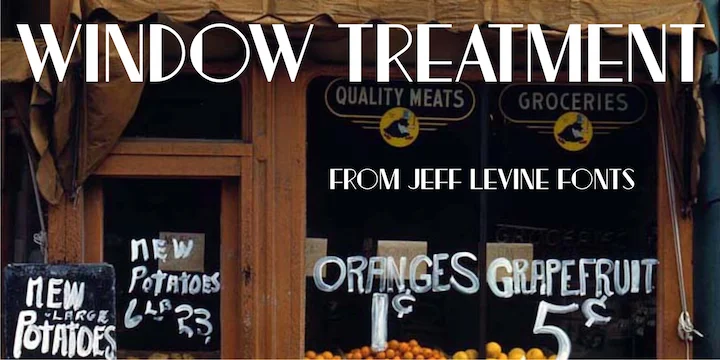
Window Treatment JNL by Jeff Levine Fonts is an Art Deco display typeface that brings thick-and-thin stroke contrast to the style's naturally geometric character. The letterforms balance weight dramatically between vertical and horizontal strokes, creating a visual rhythm that feels both authoritative and elegant. It avoids looking either stiff or overwrought, landing in that sweet spot where vintage style actually serves a design function rather than just sitting pretty.
You'll see this typeface perform best in applications that benefit from 1920s sophistication and geometric confidence. Speakeasy menu covers, luxury jewelry packaging, art deco wedding invitations, and vintage-inspired event signage all come alive with this font's presence. Because the contrast between strokes naturally enforces visual hierarchy, your headlines command attention without extra design tricks. This period-specific character works best when that reference is intentional and supports your concept rather than distracting from it. Think carefully about where a period aesthetic belongs, then set this typeface confidently in that space.
If you're building work that calls for genuine 1920s visual language and historical grounding in letterforms, Window Treatment JNL from Creative Fabrica is worth adding to your collection. It's the kind of typeface that makes other design decisions feel smarter by association.
Style & Use Cases
- Overall Style
- Bold, Distinctive
- Use Case
- Headlines, Posters
- Ideal For
- logos, packaging, and standout titles
- Pairs With
- a neutral sans-serif
How to Install WINDOW TREATMENT JNL Font
Step-by-step instructions for every platform
- 1Download the WINDOW TREATMENT JNL font file (.ttf or .otf).
- 2Locate the downloaded file in your Downloads folder.
- 3Right-click the font file.
- 4Select "Install" to install for the current user, or "Install for all users" to make it available system-wide.
- 5WINDOW TREATMENT JNL is now available in Word, Photoshop, Illustrator, and all other apps.
More by Jeff Levine Fonts
View all →



Browse fonts by theme
Curated collections →Saw a font in a picture? Identify any font from an image with our free Font Finder.
More Decorative Fonts
Browse all →







What pairs well with WINDOW TREATMENT JNL Font?
WINDOW TREATMENT JNL Font is a decorative font that shines as a display or heading face. Pair it with a clean sans-serif or serif font for body text — the contrast creates a clear hierarchy while the two styles stay balanced and easy to read.




WINDOW TREATMENT JNL Font
Reviewed by the FontBoxDL team · Updated June 2026