 Firefox
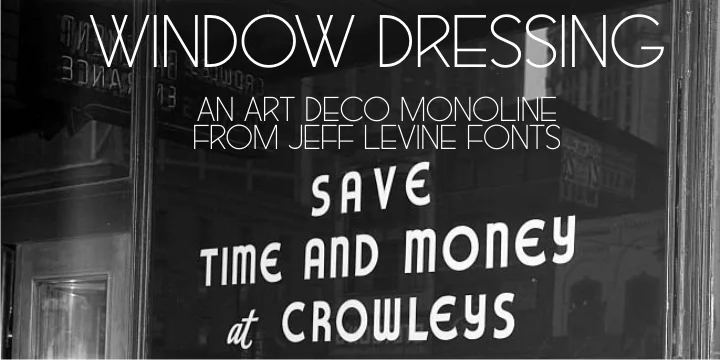
About WINDOW DRESSING JNL Font
Window Dressing JNL draws its character from mid-twentieth-century cast metal letterforms, originally captured in an architectural signage catalog. Designed by Jeff Levine Fonts, this typeface translates those sturdy, geometric forms into a digital format that retains the era's straightforward, functional aesthetic. What sets it apart is how the distinctive B and R letterforms catch your eye, their unusual shapes hinting at the practical metalwork that inspired them while clean, structured lines define every character.
This font works wonderfully for projects that need authentic vintage personality without feeling contrived. Retro diner menus and storefront signage benefit from its confident geometry, while mid-century modern branding packages gain genuine period authenticity that speaks to the design-conscious. Consider it for antique shop window labels, vintage record album artwork, or packaging designs that aim to evoke the 1950s without dipping into parody. The straightforward design language reads equally well at large display sizes and smaller applications, making it versatile across different materials and formats. Its practical character set ensures smooth implementation across any design system.
This typeface is best suited for designers creating authentic mid-century modern work, from brand identity systems and marketing collateral to environmental graphics and wayfinding projects. Find it on Creative Fabrica.
Style & Use Cases
- Overall Style
- Bold, Distinctive
- Use Case
- Headlines, Posters
- Ideal For
- logos, packaging, and standout titles
- Pairs With
- a neutral sans-serif
How to Install WINDOW DRESSING JNL Font
Step-by-step instructions for every platform
- 1Download the WINDOW DRESSING JNL font file (.ttf or .otf).
- 2Locate the downloaded file in your Downloads folder.
- 3Right-click the font file.
- 4Select "Install" to install for the current user, or "Install for all users" to make it available system-wide.
- 5WINDOW DRESSING JNL is now available in Word, Photoshop, Illustrator, and all other apps.
More by Jeff Levine Fonts
View all →



Browse fonts by theme
Curated collections →Saw a font in a picture? Identify any font from an image with our free Font Finder.
More Decorative Fonts
Browse all →







What pairs well with WINDOW DRESSING JNL Font?
WINDOW DRESSING JNL Font is a decorative font that shines as a display or heading face. Pair it with a clean sans-serif or serif font for body text — the contrast creates a clear hierarchy while the two styles stay balanced and easy to read.




WINDOW DRESSING JNL Font
Reviewed by the FontBoxDL team · Updated June 2026