 Firefox
 1 / 8
1 / 8About Wedding Wreaths Font
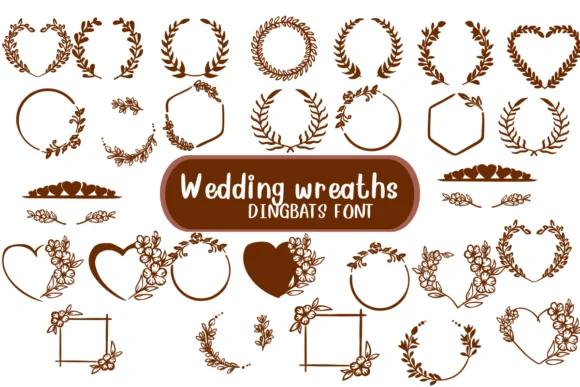
This font brings an ornate, romantic quality to every page it touches. Wedding Wreaths, designed by Nongyao, is a dingbats collection of delicately rendered floral and botanical frames, wreaths, and border elements that function as decorative symbols rather than traditional letters.
The font shines brightest on wedding invitation suites where ornamental flourishes set an immediate, upscale tone, botanical-themed greeting cards and announcement designs that feel handcrafted, decorative borders for hand-lettered stationery and scrapbooking layouts, and boutique packaging for wedding favors or luxury gift sets. You could also use individual symbols as chapter markers for printed zines, as corner ornaments in DIY ceremony programs, or as decorative elements framing product photos for indie e-commerce shops. Each symbol has enough visual weight to anchor a design while remaining simple enough to scale cleanly without losing detail. Both OTF and TTF formats are included for use across any design platform you prefer.
Pair Wedding Wreaths with a minimal serif or understated sans-serif for your body text to keep layouts from feeling too busy. The contrast between ornamental and restrained makes the wreaths pop visually while holding your overall design to elegant rather than ornate extremes. Grab it on Creative Fabrica to start weaving botanical detail into your projects.
Style & Use Cases
- Overall Style
- Iconographic, Fonts
- Use Case
- Icons, Accents
- Ideal For
- ornaments, bullets, and decorative flourishes
- Pairs With
- any text font
How to Install Wedding Wreaths Font
Step-by-step instructions for every platform
- 1Download the Wedding Wreaths font file (.ttf or .otf).
- 2Locate the downloaded file in your Downloads folder.
- 3Right-click the font file.
- 4Select "Install" to install for the current user, or "Install for all users" to make it available system-wide.
- 5Wedding Wreaths is now available in Word, Photoshop, Illustrator, and all other apps.




Browse fonts by theme
Curated collections →Saw a font in a picture? Identify any font from an image with our free Font Finder.
More Dingbats Fonts
Browse all →







What pairs well with Wedding Wreaths Font?
Wedding Wreaths Font is a versatile dingbats font that works for both headings and body text. Pair it with a contrasting sans-serif or serif font to add visual interest and a clear distinction between titles and body copy.




Wedding Wreaths Font
by Nongyao
Reviewed by the FontBoxDL team · Updated July 2026