 Firefox
 1 / 8
1 / 8About Wave Swash Elements Font
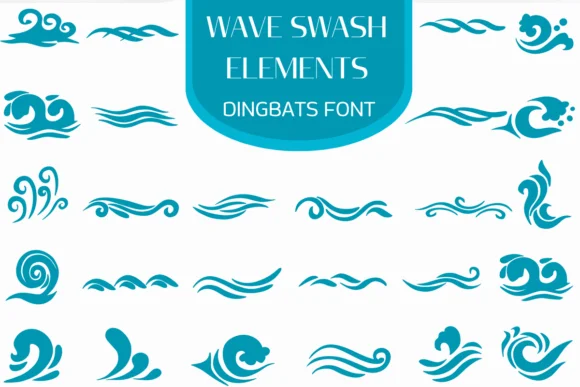
Wave Swash Elements from Heartcraft Atelier brings a collection of flowing, organic wave forms and decorative swashes to the dingbat category. These aren't your standard design tools; they're carefully crafted elements that capture water's natural motion and fluidity in vector form, ideal for projects where visual flow and movement matter. Use them for coastal-themed wedding invitations, ocean-inspired greeting cards, and water-centric branding work that needs that organic, watery aesthetic.
You'll find these elements particularly useful for hand-lettered stationery suites, DIY wedding welcome signs, and Etsy product banners for boutique bath and skincare brands. Layer the outlined and filled versions for dimensional depth in your design software, mixing and matching the forms to suit your layout. Available in both OTF and TTF formats, the collection works across Procreate, Affinity Designer, and Affinity Photo without any compatibility issues.
Designers and small business owners working in nautical themes, surfer culture, or natural product aesthetics will find constant use for these flowing wave forms. If water-themed branding or ocean-inspired visual systems are central to your design practice, Wave Swash Elements definitely belongs in your toolkit. Grab it on Creative Fabrica and start building with these flowing elements in your next creative project.
Style & Use Cases
- Overall Style
- Iconographic, Fonts
- Use Case
- Icons, Accents
- Ideal For
- ornaments, bullets, and decorative flourishes
- Pairs With
- any text font
How to Install Wave Swash Elements Font
Step-by-step instructions for every platform
- 1Download the Wave Swash Elements font file (.ttf or .otf).
- 2Locate the downloaded file in your Downloads folder.
- 3Right-click the font file.
- 4Select "Install" to install for the current user, or "Install for all users" to make it available system-wide.
- 5Wave Swash Elements is now available in Word, Photoshop, Illustrator, and all other apps.
More by Heartcraft Atelier
View all →



Browse fonts by theme
Curated collections →Saw a font in a picture? Identify any font from an image with our free Font Finder.
More Dingbats Fonts
Browse all →







What pairs well with Wave Swash Elements Font?
Wave Swash Elements Font is a versatile dingbats font that works for both headings and body text. Pair it with a contrasting sans-serif or serif font to add visual interest and a clear distinction between titles and body copy.




Wave Swash Elements Font
Reviewed by the FontBoxDL team · Updated June 2026