 Firefox
About VOCALIST JNL Font
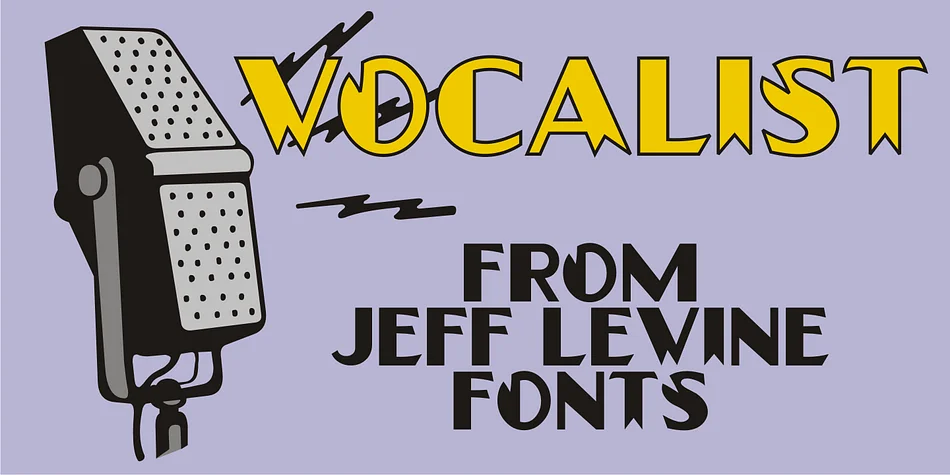
VOCALIST JNL channels the swagger and polish of 1940s sheet music art. Designed by Jeff Levine, this decorative typeface draws from hand-lettered vintage sources and captures that unmistakable Art Deco energy. The thick-and-thin contrast that defined the era runs through every character, while strategic wedge cutouts in select letters and numbers add graphic punch and visual rhythm. These design details prevent the typeface from feeling too formal or straight, instead giving it that playful period personality that makes it instantly recognizable.
This typeface shines for specific projects where retro charm carries real weight: swing era band posters, vintage cocktail lounge menus, 1940s-themed event invitations, and speakeasy or jazz club signage. The novelty character makes it particularly effective when you want a design to feel authentically mid-century without tipping into camp or parody. The wedge cuts themselves work as visual design elements, turning simple text into something with genuine presence and movement on the page.
Pair VOCALIST JNL with a clean, modern sans-serif for body text to let the typeface's personality stand out without overwhelming the layout. The contrast between the two makes both work harder in your design. Find it on Creative Fabrica and bring some mid-century style to your next project.
Style & Use Cases
- Overall Style
- Bold, Distinctive
- Use Case
- Headlines, Posters
- Ideal For
- logos, packaging, and standout titles
- Pairs With
- a neutral sans-serif
How to Install VOCALIST JNL Font
Step-by-step instructions for every platform
- 1Download the VOCALIST JNL font file (.ttf or .otf).
- 2Locate the downloaded file in your Downloads folder.
- 3Right-click the font file.
- 4Select "Install" to install for the current user, or "Install for all users" to make it available system-wide.
- 5VOCALIST JNL is now available in Word, Photoshop, Illustrator, and all other apps.
More by Jeff Levine Fonts
View all →



Browse fonts by theme
Curated collections →Saw a font in a picture? Identify any font from an image with our free Font Finder.
More Decorative Fonts
Browse all →







What pairs well with VOCALIST JNL Font?
VOCALIST JNL Font is a decorative font that shines as a display or heading face. Pair it with a clean sans-serif or serif font for body text — the contrast creates a clear hierarchy while the two styles stay balanced and easy to read.




VOCALIST JNL Font
Reviewed by the FontBoxDL team · Updated June 2026