 Firefox
 1 / 8
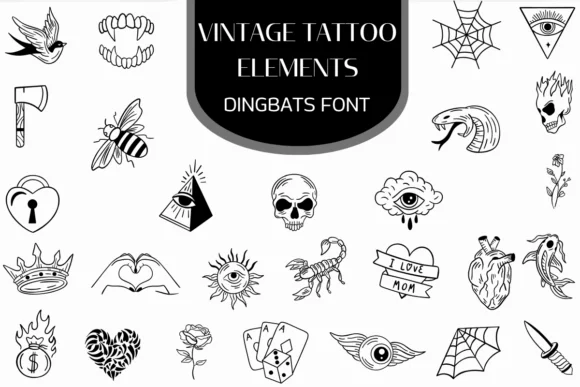
1 / 8About Vintage Tattoo Elements Font
This dingbats collection channels the grit and nostalgia of old-school tattoo parlors. Vintage Tattoo Elements, designed by Heartcraft Atelier, brings traditional tattoo iconography into your digital toolkit as a working font of dingbats and decorative elements. Sketched with bold, confident lines and steeped in classic motifs (skulls, anchors, roses, swallows, and daggers), it captures the authentic rough-and-tumble aesthetic that defined golden-age tattoo flash sheets and parlor windows.
You'll find real utility building tattoo shop storefront signage and social media graphics, designing vintage band merchandise labels for independent musicians, creating old-school biker poster layouts for car meets and automotive events, or crafting retro vinyl decal designs for motorcycle culture markets. The collection spans both OTF and TTF formats, ensuring smooth installation across any setup you use. Whether you work in Procreate, Affinity Designer, or Affinity Photo, the full set installs without friction, giving you access to the complete dingbat library across desktop and tablet environments.
The bold, expressive lines read best when grounded by something calm. Pair these decorative elements with a clean geometric sans-serif for body text or secondary headlines. This combination tames the vintage edge while preserving legibility and character. Get Vintage Tattoo Elements from Creative Fabrica and bring that unmistakable hand-drawn ink aesthetic to your work.
Style & Use Cases
- Overall Style
- Iconographic, Fonts
- Use Case
- Icons, Accents
- Ideal For
- ornaments, bullets, and decorative flourishes
- Pairs With
- any text font
How to Install Vintage Tattoo Elements Font
Step-by-step instructions for every platform
- 1Download the Vintage Tattoo Elements font file (.ttf or .otf).
- 2Locate the downloaded file in your Downloads folder.
- 3Right-click the font file.
- 4Select "Install" to install for the current user, or "Install for all users" to make it available system-wide.
- 5Vintage Tattoo Elements is now available in Word, Photoshop, Illustrator, and all other apps.
More by Heartcraft Atelier
View all →
Browse fonts by theme
Curated collections →Saw a font in a picture? Identify any font from an image with our free Font Finder.
More Dingbats Fonts
Browse all →






What pairs well with Vintage Tattoo Elements Font?
Vintage Tattoo Elements Font is a versatile dingbats font that works for both headings and body text. Pair it with a contrasting sans-serif or serif font to add visual interest and a clear distinction between titles and body copy.




Vintage Tattoo Elements Font
Reviewed by the FontBoxDL team · Updated August 2026