 Firefox
 1 / 8
1 / 8About Vintage Ornament Font
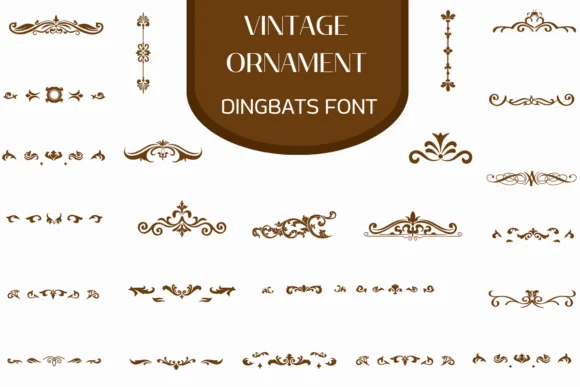
You're designing a formal wedding invitation suite and need ornamental elements that feel hand-crafted yet refined. Vintage Ornament, a dingbat collection from Heartcraft Atelier, delivers exactly that: dozens of carefully drawn scrolls, frames, dividers, and flourishes rendered in warm brown tones that echo period design. The glyphs capture the intricacy and character of old-world ornamentation without the generic feel of typical digital decoration.
This font shines on certificate borders, luxury food labels, vintage book chapter headers, and boutique branding projects where classical elegance really matters. Simply type a character to pull up whichever element you need, then scale or rotate it to fit your layout. The swirls and decorative flourishes layer beautifully, and the coloring outline format gives you room to adjust the visual weight and tone to match your palette. Both OTF and TTF versions integrate smoothly into Procreate, Affinity Designer, Affinity Photo, and other popular design software.
The real strength is versatility paired with genuine craft. A single weight handles most ornamental work well, and since these are dingbats rather than letters, you can scale and rotate them freely without dealing with kerning or baseline shifts. Get it from Creative Fabrica and start building designs with real character and depth.
Style & Use Cases
- Overall Style
- Iconographic, Fonts
- Use Case
- Icons, Accents
- Ideal For
- ornaments, bullets, and decorative flourishes
- Pairs With
- any text font
How to Install Vintage Ornament Font
Step-by-step instructions for every platform
- 1Download the Vintage Ornament font file (.ttf or .otf).
- 2Locate the downloaded file in your Downloads folder.
- 3Right-click the font file.
- 4Select "Install" to install for the current user, or "Install for all users" to make it available system-wide.
- 5Vintage Ornament is now available in Word, Photoshop, Illustrator, and all other apps.
More by Heartcraft Atelier
View all →



Browse fonts by theme
Curated collections →Saw a font in a picture? Identify any font from an image with our free Font Finder.
More Dingbats Fonts
Browse all →







What pairs well with Vintage Ornament Font?
Vintage Ornament Font is a versatile dingbats font that works for both headings and body text. Pair it with a contrasting sans-serif or serif font to add visual interest and a clear distinction between titles and body copy.




Vintage Ornament Font
Reviewed by the FontBoxDL team · Updated June 2026